




Summarizing
The Summary feature creates a shorter version of a document’s content, helping you identify its main information without reading the entire text.
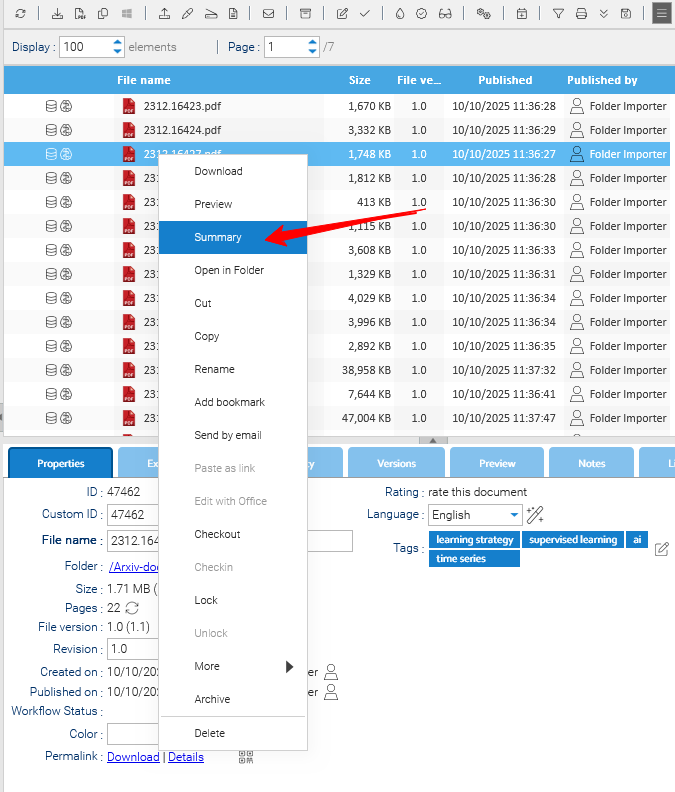
To summarize a document, right-click on it and select Summary.
Available Summarizers
LogicalDOC supports two approaches to summarization:
- LogicalDOC Summarizer: selects the most representative sentences from the document, preserving their original wording and order. Processing takes place locally.
- ChatGPT Summarizer: generates a summary in new wording using an external AI service. The document’s text is sent to OpenAI for processing outside your organization’s infrastructure.
Configuration
The following properties control the LogicalDOC Summarizer.

Model: Pre-trained MiniLM model in ONNX format, used to calculate sentence embeddings.
Sentences: Maximum number of sentences included in the summary. The default is 5.
Lambda: Controls the balance between relevance and avoiding repetition during MMR selection. The default is 0.7
Editing the Summary
After generating a summary, you can edit its content directly in the summary editor, by clicking on Edit. You can revise the wording, remove unnecessary information or add details to suit your needs. This applies to summaries produced by either summarizer.
Editing the summary does not change the original document’s content.