




Reassigning Tasks
If for some reason a task cannot be completed by the current assignee, it is possible to reassign it to another user.
Reassign from the task's detail
Inside the Workflow's dashboard double-click on the task and click on Reassign User.
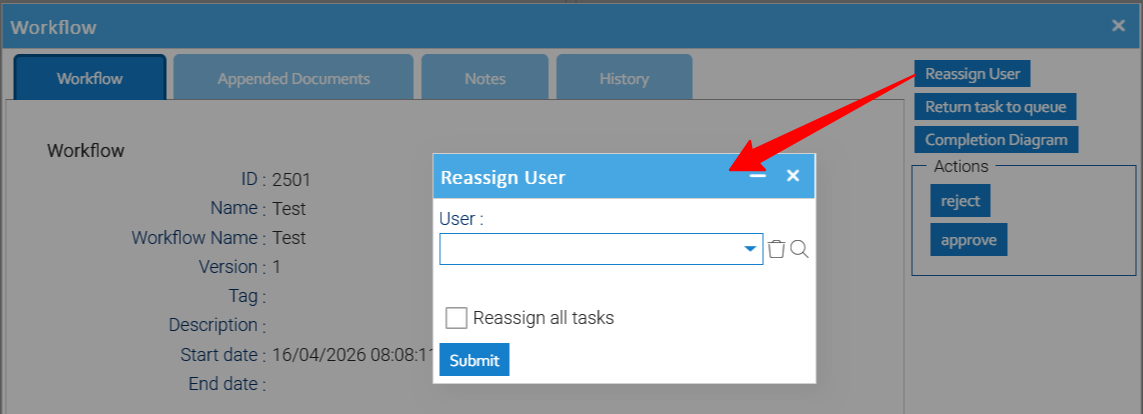
Here just select the new user to assign the current task to, if you also check the Reassign all tasks option, all the other tasks currently operated by the same actual assignee will be reassigned too.
Reassign from the dashboard
In the list of tasks, select those you want to assign a different user, right-click to open the contextual menu and choose Assign.
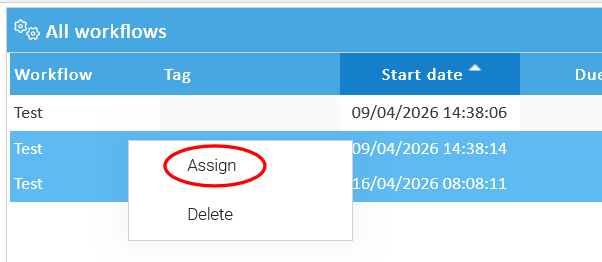
Here just choose the new user to assign the current selection.