Web Services API

LogicalDOC can be used as middleware and can be integrated with other systems by the use of the built-in Web Service. The Web Service module is part of the LogicalDOC core distribution and is compliant with W3C specifications SOAP and MTOM. Using SOAP over HTTP allows for easier communication through proxies and firewalls than previous remote execution technology. MTOM is a method of efficiently sending binary data to and from web services; it allows more efficient sending of binary data in a SOAP request or response.

LogicalDOC also supports the more informal standard called RESTful.

The LogicalDOC Web Services are divided in a number of specialized services, each one dedicated to a specific topic.

API Key

In order to call the Web Services, you have to generate an API Key first: it is used to authenticate your client. Read more here.

Web Services Bindings and Samples

The easiest way to interface with LogicalDOC's API's is by using one of our Bindings and Samples we provide in the product's wiki page. In that page we provide source code projects in all major programming languages​​: Java, .Net, PHP, Python. They can be a good examples to quickly learn "hands on" how to interface with the LogicalDOC's API

Web Services Documentation

SOAP

ReleaseDocumentationCompatiblity with previous releases
9.2.1soapdoc9.2
9.2soapdoc9.1.1, 8.8
9.1.1soapdoc9.1, 8.9.3
9.1soapdoc9.0
9.0soapdoc8.9.3
8.9.3soapdoc8.9.2
8.9.2soapdoc8.9.1, 8.9
8.9.1soapdoc8.9
8.9soapdoc
8.8.6soapdoc
8.8.5soapdoc
8.8.4soapdoc
8.8.3soapdoc
8.8.2soapdoc
8.8.1soapdoc
8.8soapdoc
8.7.4soapdoc
8.7.3soapdoc
8.7.2soapdoc
8.7.1soapdoc

REST

ReleaseDocumentationCompatiblity with previous releases
9.2.1restdoc9.2
9.29.1.1, 8.8
9.1.1restdoc9.1, 8.9.3
8.9.3restdoc8.9.2
8.9.2restdoc8.9.1, 8.9
8.9.1restdoc8.9
8.8.4restdoc
8.8.3restdoc
8.8.1restdoc
8.7.4restdoc
8.6.0restdoc
8.4.2restdoc
8.3.4restdoc
8.1restdoc

API Keys

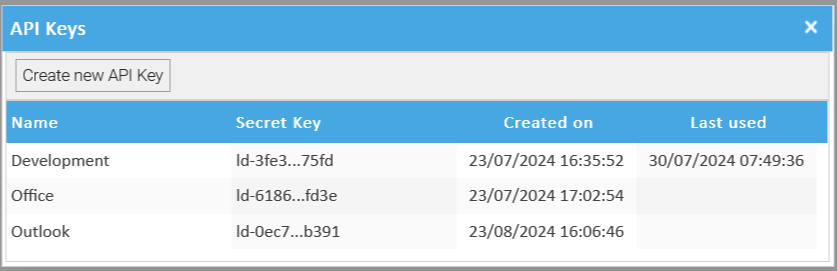
An API key is a simple encrypted string that you can use when calling LogicalDOC APIs. 

Each user can generate multiple API keys, and each one can be used by an external application to connect to LogicalDOC in the name of that user. This is more secure compared to using the user's credentials directly, and since release 9.0 the legacy credentials authentication has been deprecated in favor of the new API Key authentication.

Creating an API key

Open the menu Account > Security > API Keys.

Here click on Create new API Key, You will be asked to give a name to the new key, so type the name and confirm.


Immediately copy the code in a secure place because you won't be able to see it again.

You can then put this generated key into your application so it will be able to connect to LogicalDOC

Securing an API key

When you use API keys in your applications, ensure that they are kept secure during both storage and transmission. Publicly exposing your credentials can result in your account being compromised, which could lead to unexpected charges on your account. To help keep your API keys secure, follow these best practices:

Do not embed API keys directly in code. API keys that are embedded in code can be accidentally exposed to the public. For example, you may forget to remove the keys from code that you share. Instead of embedding your API keys in your applications, store them in environment variables or in files outside your application's source tree.

Do not share the same API key among more applications, for instance do not use the same key for the Office addins but create an API key for the Office Addin and a different key for the Outlook Addin.

Delete unneeded API keys to minimize exposure to attacks.

Review your code before publicly releasing it. Ensure that your code does not contain API keys or any other private information before you make your code publicly available.