




Classifier
The Classifier is a natural language component that assigns a category to a given text based on its content. In this system, the classifier is trained using pairs of example data, where each pair contains a category label and a sample sentence that ends with a space followed by a period ( .). This allows the classifier to learn patterns and keywords that are commonly associated with specific intents or commands.
How the Classifier Works
The Classifier is trained using labeled examples, where each line includes a category and a sentence that reflects that category. This builds a model that can later compare new inputs against what it has learned.
To train the model, the system expects a CSV file containing only one column. Each line in this column must follow a very specific format:
<category><TAB><text ending with a space followed by a period>.
Examples:
SEARCHDOC    Find any files about budget .
SEARCHDOC    Locate docs about paper .
SEARCHDOC    Retrieve documents matching "news" .
GETDOC    Can you get doc with ID 1233587 .
GETDOC    I need to access file with id 29679 .
GETDOC    Show doc with id 299 .
SEARCHFILE    File called "mywork.docx" .
SEARCHFILE    Get document called invoice.pdf .
SEARCHFILE    Open doc titled booklet.txt .
Classifier Configuration Overview
This section describes the key configuration fields for the Classifier model used in the NLP system. These settings define how the classifier behaves during training and how it interprets user input.
Properties
The Properties tab in the classifier interface contains the core configuration settings that define how the classifier behaves during training and inference. These parameters influence how the input text is processed, how features are extracted, and how language-specific rules are applied. Properly configuring these fields ensures accurate and efficient classification.
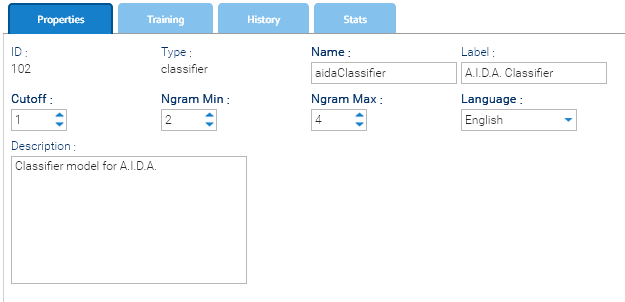
- Cutoff: the minimum number of occurrences required for a textual feature to be included during training. Lower values preserve rare features and are suitable for small datasets. Higher values remove rare features and can reduce noise in larger datasets.
- Ngram Min: the minimum number of consecutive words that can form a classification feature. A value of 1 allows individual words to be used.
- Ngram Max: the maximum number of consecutive words that can form a classification feature. Higher values allow the classifier to learn longer expressions but normally require more training examples.
- Language: the language of the training examples and expected input. It determines the language-specific text-processing and stop-word rules used by the classifier.