Install a Trained Model
Training AI models is a computationally intensive and time-consuming process, often requiring specialized hardware and large datasets. For this reason, not all models can be trained directly within LogicalDOC.
To simplify adoption, the system allows users to install and use pre-trained models, which are ready to operate without additional training.
These models can be downloaded and imported into the platform, enabling advanced features such as document tagging and language detection with minimal setup.
The import process is straightforward:
1
Enter the models section
Go to Administration > Artificial Intelligence > Models
2
Download the Model file
The model to import must be a file exported from another installation or downloaded from the LogicalDOC's download center. Here are the currently available pre-trained models:
| Model | Version | Type | Compatibility | Description | Download |
|---|---|---|---|---|---|
| zeroshot-1.0 | 1.0 | zeroshot | 9.2.3+ | Pre-trained zero-shot classification model to generate tags for documents. This model can assign relevant labels to text without requiring prior training on specific categories, allowing users to define their own tags dynamically. It analyzes the semantic meaning of the content and matches it against candidate labels, returning the most relevant tags with associated confidence scores. | |
| language-1.0 | 1.0 | language | 9.2.3+ | Pre-trained language detection model from Apache OpenNLP to automatically identify the language of a document. The model supports detection of over 100 languages and returns standardized ISO 639-3 language codes, enabling accurate and consistent language classification for textual content. | |
| yolo4invoices-1.0 | yolo | 9.3+ | YOLO 11m model used to identify objects within images, pre-trained with the Fatura dataset. Great for testing YOLO's capabilities; do not use in production. |
3
Import the Model file
Once you have downloaded your model file, Click on the Import button.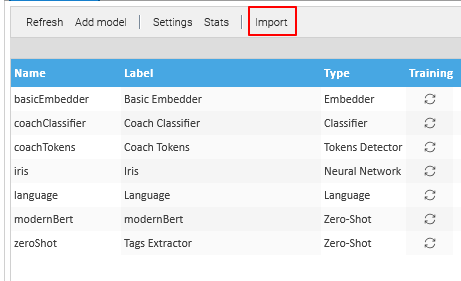
Once the Upload window appears click on Upload and select the downloaded model.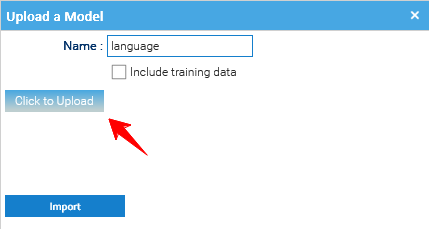
The model will appear in the list of the available models.
4
Update an Existing Model
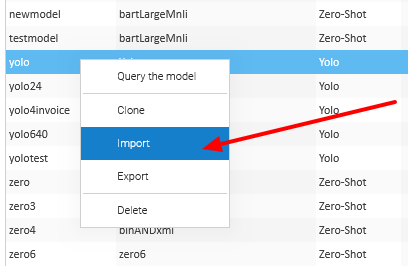
To update a pre-existing model, it sufficient to right-click on the model name in the Model Panel and select Import to upload a newly trained model.