Embeddings
Embeddings are vectors representing entire documents or fragment of them into a continuous vector space. This numerical representation of is required to efficiently infer similitudes between documents and implement features like Semantic Search.
This means that LogicalDOC must calculate all these embeddings for the documents in your repository and save them into the Vectors Store, whose setup is a requirement.
Embedding Schemes
The process of calculating an embedding of a document is not unique, but depends on what embedding model you use.
In Administration > Artificial Intelligence > Embeddings, you can handle different embedding schemes, each one telling LogicalDOC how to process the documents with a specific embedding model.
When you create a new scheme by clicking on Add embedding scheme, you will be required to specify one of the available embedding models.
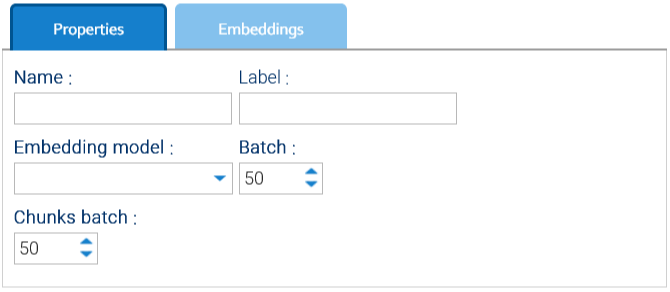
At the time of writing, you can choose among the Embedder models directly coded in LogicalDOC itself or one of the embedding models available in ChatGPT.
Settings common to all embedding models are:
- Batch: The maximum number of Documents written to the vector store in a single operation.
- Chunks batch: How many chunks gets added into the vector store at the same time.
Settings specific to ChatGPT model are:
- Model Spec.: name of the embedding model to use, e.g.: text-embedding-3-small
- Vector size: must match the exact size of the embeddings produced by the chosen model, in case of text-embedding-3-small the size is 1536
- API Key: your API key provided by ChatGPT
For more information about ChatGPT embeddings, please refer to https://platform.openai.com/docs/guides/embeddings
Info
Like the full-text indexing, even the calculation of the embeddings is very CPU intensive and so it gets carried out by the scheduled task Embedder.
Settings
Click on the Settings button to see configuration parameters that regulate how the task works.
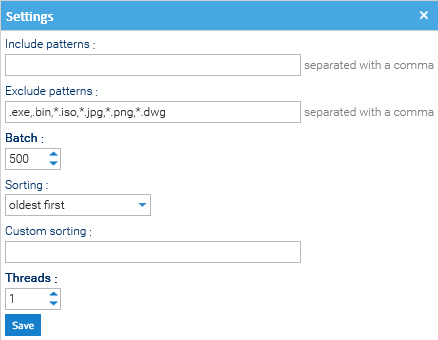
- Include patterns: which document type should be embedded. If left empty, all documents will be included by default.
- Exclude patterns: which document type should not be embedded. For example to exclude all documents with .png extension, you can insert *.png in the field.
- Batch: number of Documents to be processed together by the Embedder task.
- Sorting: Determines the order in which pending documents are embedded (e.g., prioritizing newer files or smaller files to optimize throughput).
- Custom Sorting: Possibility to define a custom sorting logic.
- Threads: how many parallel "workers" are running at the same time to process the embedding queue.
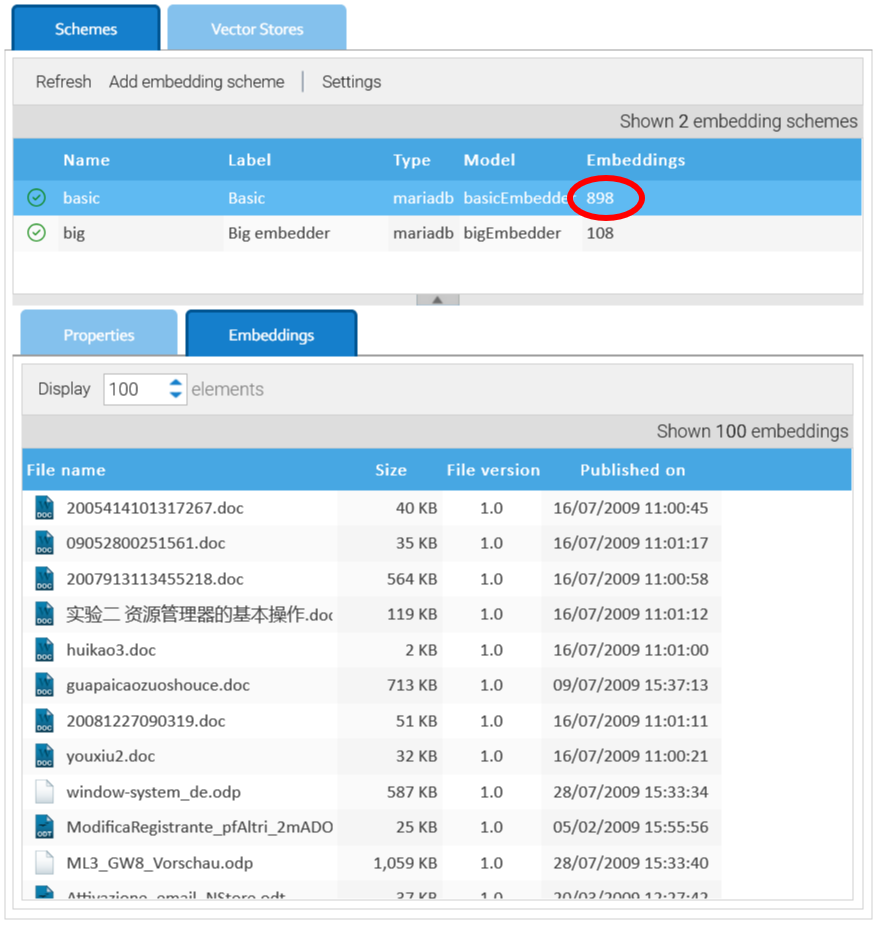
As vectors are calculated and saved into the vector store, you can see this in the counter and in the Embeddings panel.