




Anonymous Login
With the anonymous login option you can grant access to the system by anonymous users without passing through the login page and the normal authorization chain.
To activate anonymous login please go in Administration > Access Control > Security > Anonymous.
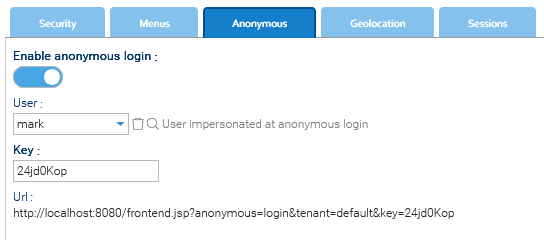
Once everything is set up do not forget to Save.
When the option is enabled you can distribute the special URL as shown above, to people not registered in the system. Anyone accesses to that URL will be automatic logged in as he was the user selected in the User parameter.
The anonymous visitor can do inside the repository whatever thing that the assigned User can do on the basis of the security policies that you granted him. Please note that part of the anonymous URL is regulated by the Key parameter, so change it in case you need to invalidate already distributed URLs.
Use with care
Please enable this option just in cases where you really need it, and make sure to assign a user with limited access to your repository