




Setting up document's security policies
If you have the Security permission in a document, you can access the Security tab of the details panel.
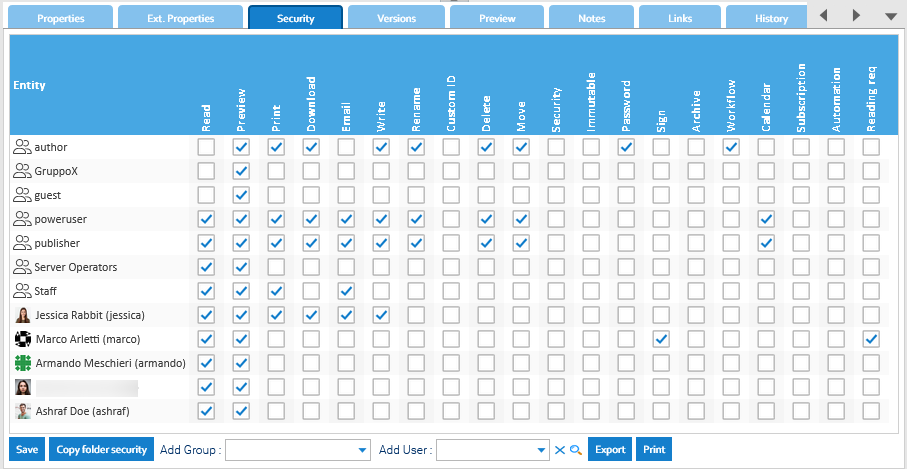
Here you can see a grid in which you can grant / revoke permissions to groups and users.
To grant / revoke a single permission, just check / uncheck the corresponding checkbox.
To add a new security entity use Add Group or Add User list boxes, while to drop an element right-click on the name and press Delete or just revoke the Read permission.
If you want to make your changes persistent in the current folder, you have to press the Apply Rights button.
Complete list of Permissions
| Permission | Applicable Resources | Actions Allowed on Resources |
|---|---|---|
| Read | all | accessing and using |
| Preview | document | displaying in the interface |
| document | printing | |
| Download | document, folder | extracting from the platform |
| document | including the resource in an email | |
| Write | all | editing |
| Add | folder | adding new elements inside |
| Security | document, folder | managing security policies |
| Immutable | document | enabling immutability |
| Password | document | protecting with a password |
| Delete | all | logically removing |
| Move | document, folder | moving into another location |
| Rename | document, folder | modifying the name |
| Custom ID | document | editing the Custom ID |
| Revision | document | editing the Revision |
| Import | folder | importing from .zip archives or other source |
| Export | folder | exporting to .zip archive or other target |
| Sign | document | digitally signing |
| Archive | document, folder | archiving or inserting into an export archive |
| Workflow | document | launchin a new workflow instance |
| Calendar | document | creating a calendar event |
| Subscription | document, folder | subscribing other users to the issued alerts |
| Automation | document, folder | invoking an automation routine |
| Reading request | document | sending a reading request |
| Store | folder | changing the default store |
Admins can do everything
The users in the admin group always have full permissions on all the resources.Inherit security policies from the folder
If you do not specify any security policy at document level, the system will use by default the parent folder's policies. If you specify security policies at document level, then they completely overwrite those specified in folder.