Tokens Detector

The Tokens Detector is a specialized natural language model designed to identify and extract specific pieces of information, called tokens, from within a sentence. It is used to detect structured data like IDs, names, dates, or codes embedded in natural language text.

Unlike a classifier, which categorizes entire sentences, the tokens detector focuses on marking and labeling subsections of a sentence. This is particularly useful for applications that need to extract values from user requests, such as document IDs or references.

How the Tokens Detector Works

The Tokens Detector is trained using labeled sentences in which tokens of interest are clearly marked using a special format. Each token to be detected is wrapped using <START:label> and <END> tags. These indicate both the boundaries of the token and the type of information being extracted. Specifically, these tags (<START:label> and <END>) teach the system how to recognize similar structures and values in new, unseen text.

Examples: 

I am searching for the document with id <START:docId> 12356897 </START:docId>, please send it to me.
All employees are encouraged to find doc with id <START:docid> 0023 <END> on the HR portal.
Interested faculty and graduate students can find document with id <START:docid> 1250 <END>. Please open file titled <START:filename> launch_brief.txt <END>.
The revised pipeline is presented in the document <START:filename> ingestion_workflow_diagram_v2.pdf <END>.
To explore the many benefits of developing a consistent reading habit, see the document called <START:filename> reading-benefits.txt <END>.  Please, retrieve any documents about <START:expression> 1250 <END> paper .
Locate the finance policy document containing <START:expression> "card*" <END> usage rules and restrictions.
I need you to find all compliance documentation that specifies <START:expression> dev* <END> for our legal counsel.

As shown above, the detector uses labeled examples where the tokens are tagged explicitly. Therefore, It learns how to recognize these token types based on:

  • Word position
  • Word shape (numbers, uppercase, etc.)
  • Context around the token

Token Detection

When a sentence is submitted to the model, it first breaks it into tokens (typically words or punctuation marks) using a language-specific tokenizer. This step is essential for accurate recognition of token boundaries. The trained model scans the tokenized sentence and identifies spans of words that match learned patterns. Each span is returned along with:

  • The label of the token (e.g., docid)
  • The value (e.g.,12356897)
  • A confidence score

Classifier

The Classifier is a natural language component that assigns a category to a given text based on its content. In this system, the classifier is trained using pairs of example data, where each pair contains a category label and a sample sentence that ends with a space followed by a period ( .). This allows the classifier to learn patterns and keywords that are commonly associated with specific intents or commands.

How the Classifier Works

The Classifier is trained using labeled examples, where each line includes a category and a sentence that reflects that category. This builds a model that can later compare new inputs against what it has learned.
To train the model, the system expects a CSV file containing only one column. Each line in this column must follow a very specific format:

<category><TAB><text ending with a space followed by a period>. 

Examples:

SEARCHDOC    Find any files about budget .
SEARCHDOC    Locate docs about paper .
SEARCHDOC    Retrieve documents matching "news" .
GETDOC    Can you get doc with ID 1233587 .
GETDOC    I need to access file with id 29679 .
GETDOC    Show doc with id 299 .
SEARCHFILE    File called "mywork.docx" .
SEARCHFILE    Get document called invoice.pdf .
SEARCHFILE    Open doc titled booklet.txt .

Classifier Configuration Overview

This section describes the key configuration fields for the Classifier model used in the NLP system. These settings define how the classifier behaves during training and how it interprets user input.

Properties

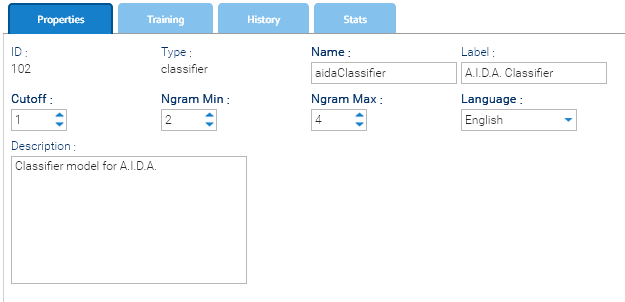
The Properties tab in the classifier interface contains the core configuration settings that define how the classifier behaves during training and inference. These parameters influence how the input text is processed, how features are extracted, and how language-specific rules are applied. Properly configuring these fields ensures accurate and efficient classification.

classifier_properties_specs
 

  • Cutoff: a threshold value used during training to filter low-probability features. A lower value means more features are used; a higher value makes the model stricter.
  • Ngram Min: the minimum size of n-grams (word sequences) to consider during training (e.g., 2 = bigrams).
  • Ngram Max: the maximum size of n-grams to include during training (e.g., 4 = up to 4-word sequences).
  • Language: the language of the training dataset (e.g., English). This helps the system load appropriate stop words and processing rules.

Embedder

The Embedder class models enable the mapping of entire documents to fixed-length vectors, making it possible their representation in a continuous vector space. This facilitates efficient comparison and manipulation of textual data in natural language processing (NLP) like semantic searches.

How the Embedder Works

The transformation of a document's content into a vector is realized through the Doc2Vec algorithm, this manual is not the right place to treat details of this technique, but you may find a lot of literature about this topic.

In a few words, the Doc2Vec makes use of a particular neural network to create a numerical representation of a document (the vector) that in general will be stored into a Vector Store, similar documents will be represented by two different yet adjacent vectors in the multidimensional vector space.

The Embedder is trained using paragraphs of text written in natural language, each paragraph terminated by a dot followed by a blank line:

Example:

She quickly dropped it all into a bin, closed it with its wooden
lid, and carried everything out. She had hardly turned her back
before Gregor came out again from under the couch and stretched
himself.

This was how Gregor received his food each day now, once in the
morning while his parents and the maid were still asleep, and the
second time after everyone had eaten their meal at midday as his
parents would sleep for a little while then as well, and Gregor's
sister would send the maid away on some errand. Gregor's father and
mother certainly did not want him to starve either, but perhaps it
would have been more than they could stand to have any more
experience of his feeding than being told about it, and perhaps his
sister wanted to spare them what distress she could as they were
indeed suffering enough.

Embedder Configuration Overview

This section describes the key configuration fields for the Embedder model. These settings define how the embedder behaves during training and how it interprets user input.

Properties

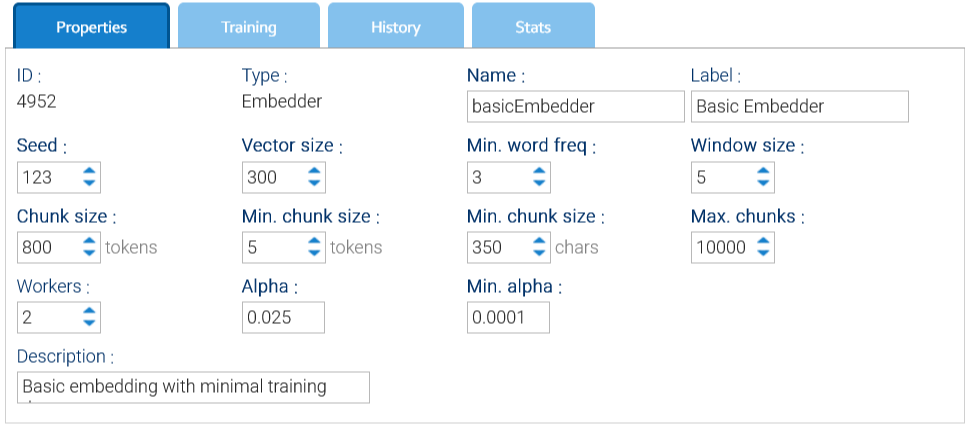
The Properties tab in the embedder interface contains the core configuration settings that define how the embedder behaves during training and embedding. These parameters influence how the input text is processed.

classifier_properties_specs
 

  • Seed: just a value used for random numbers generation
  • Workers: number of threads used for training
  • Window size: size of the window used by the Doc2Vec algorithm
  • Vector Size: number of elements in each single vector, should be greater than 300
  • Min. word freq: words that appear less than this number will be discarded
  • Max chunks: each document is subdivided into chunks of tokens, here you give a maximum number of admitted chunks
  • Chunk size: target number of tokens into a single chunk
  • Min. chunk size: minimum number of tokens and characters into a single chunk
  • Alpha: the initial learning rate(the size of weight updates in a machine learning model during training), default is 0.025
  • Min Alpha: learning rate will linearly drop to min alpha over all inference epochs, default is 0.0001

Artificial Intelligence

Artificial Intelligence or simply AI, could be defined as a technology that enables machines to simulate human learning, comprehension, problem-solving, decision-making, creativity and autonomy.

Beyond such introduction, there is no single, simple definition of Artificial Intelligence because AI tools are capable to performs tasks under varying and unpredictable circumstances without significant human oversight and can learn from experience and improve performance when exposed to data sets.

LogicalDOC contains a general purpose AI engine with which you can solve problems even not strictly related to document management, but with the advantage of being able to benefit from all the potential of a Document Management System to manage large volumes of data necessary for training.

Models

AI models are programs that implement an algorithm designed to solve a problem in the same way it would do a human brain, you can also look at them as artificial brains enabling systems to learn from data and perform tasks like analysis, prediction, and content generation.

At the time of writing, LogicalDOC supports this set of models:

  • Neural Network: useful to predict the category or nature of an object on the basis of input data
  • Classifier: uses Natural Language Processing (NLP) to catalog a naturally written text
  • Tokens Detector: uses Natural Language Processing (NLP) to extract tokens from a naturally written text

Discover more about models 

Samplers

Models cannot do anything without having been trained: like children, they must learn from experience in order to 'understand' how to solve a given problem.

In AI, this experience is built through a process called training that basically presents to the model a huge dataset of examples. The size and quality of the dataset impacts the model's ability to identify patterns in the data and therefore to understand the problem.

Samplers are those objects responsible for retrieving data used in training the models.

Discover more about samplers 

Samplers

A sampler is an object used to retrieve and prepare a dataset for the training of a model.

You handle the samplers in Administration > Artificial Intelligence > Models > Samplers

You can count on different types of samplers with different settings:

SamplerDescriptionSettings
CSV

Reads the contents of a CSV file extracting all the rows as string arrays.
Expected format of each resource is this one:

5.1,3.5,1.4,.2,"Setosa"
7,3.2,4.7,1.4,"Versicolor"
6.2,3.4,5.4,2.3,"Virginica"

This example will produce three rows of 5 elements each:

5.1, 3.5, 1.4, .2, Setosa
7, 3.2, 4.7, 1.4, Versicolor
6.2, 3.4, 5.4, 2.3, Virginica
  • Delimiter: the character used as fields delimiter
  • Quote: the character used to enclose the value of a field
  • Document: the CSV document that contains the data
Paragraph

Extracts the paragraphs, interpreted as blocks of text separated by blank lines.
Expected format of each resource is this one:

A colleague of mine told me that the document 12356897 contains very important information, so I want to get it. Understood, but are you registered as LogicalDOC's user? If you are a user, just access the interface and then execute a search by document id = 12356897.

Where can I locate a specific file? I was not able to find what I was looking for. Ok, just enter LogicalDOC and search for document with ID -96668429, it is very easy. Sure! Easy and quick, many thanks for your hint.

The example above will produce two paragraphs.

  • Document: the text document that contains the data
MetadataExtract samples from a list of documents. By default the extended attributes of the documents are considered as the features, and so all the documents in the referenced folder must share the same attributes scheme. With the Automation you may also extract whatever data for each document.
  • Folder: the folder that contains the documents to process
  • Category: name of the extended attribute that contains the category, optional
  • Features: ordered comma-separated list name of extended attributes used to store the feature values
  • Automation: an automation script used to extract a sample from a source document accessible via the dictionary key $document
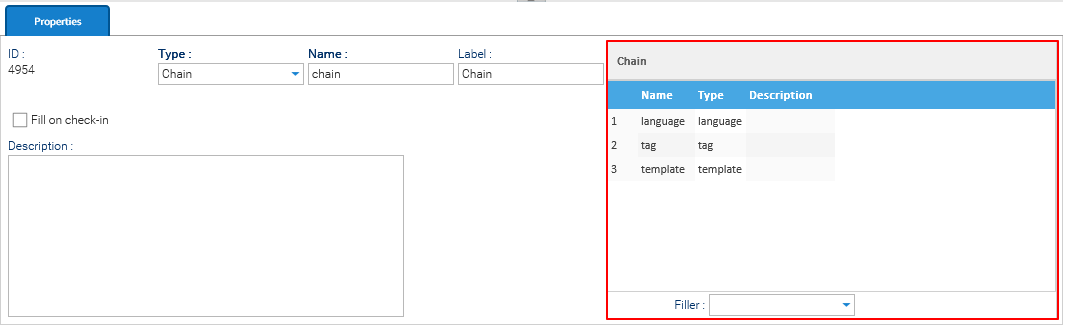
ChainCollects the samples extracted by a collection of other samplers
  • Chain: ordered list of samplers