workflows is required
Launch a workflow on a selection of documents
If you have the Workflow permission in the current folder, you can manually start a workflow, simply by selecting the items from the documents list grid and clicking on the Start workflow icon. The system asks you to choose one of the available...Designing a Workflow
To add a new Task in your workflow template, click the on Add Task button in the toolbar and a new square appears into the design panel. By default, it is a blue square, if you want to make it your initial task, just double click over it and select the...Workflow
All the documents evolve according to a defined life cycle. There are different ways that this can be done. One option is to use a workflow. A workflow is a process in which a chain of users is defined to review, approve or reject a document. Workflows...Workflow triggers
Workflows can be automatically started when documents are created into a specific folder. If you have the Workflow permission in the current folder, you can configure the automatic workflow execution. In the Workflow tab of the folder's properties...Creation
Into the [Workflow] panel you can create and configure a new workflow template. Clicking on [New Workflow Template] you can configure a new workflow template. The workflow settings consists of: Name Description Task-Assignment Reminder Supervisor In...Completing a Task
Anytime a new task in which you are a participant has to be completed, you receive a notification by email. You can see all the details of the job in the Workflow section of the Dashboard. Here you find three dashlets that show: tasks assigned to you...Workflow Elements
Each workflow is composed by several tasks connected by transitions. In the designer, each task is drawn as a box with specific icon and color, and you can move them simply by dragging the object where you want in the drawing panel. To edit the...Automation
The Automation is a pervasive aspect of the LogicalDOC platform and represents the way you have to program things using a simple scripting language. Sometimes you wish LogicalDOC to execute your own logic when something special happens during a...Workflow Status
At any given moment any workflow instance has one status, that is the currently executing task. When the workflow starts the status is the initial task you have declared in the template designer, that the status changes according with the transitions...Workflow History
In the Workflow section of the dashboard, click on History to access the complete history of all the workflow instances. In the Workflow selector, choose one of the entries to which you have access and optionally put a tag you are looking for and press...Object Detection
Object detection is a computer vision technique that identifies and locates multiple objects within an image by predicting their classes and positions using bounding boxes. Unlike image classification, which assigns a...Dashboard
The Dashboard screen offers several information services and utilities, including user statistics, tags, messages, calendar events, and workflow tasks. User This section shows statistical information about your system activities, including the list of...Complaint Rationale
tasks also. If the complaint is accepted, a payment procedure is started. DownloadParameters
In general, you configure LogicalDOC by accessing dedicated configuration sections inside the administration. However, there is a set of fine-tuning parameters collected in a single form located in the section Administration > Settings > Parameters...Invoice Approval
the payment procedures. At the end, the supplier is notified about the result. DownloadSetting up folder's security policies
If you have the Security permission in a folder, you can access the Security tab of the details panel.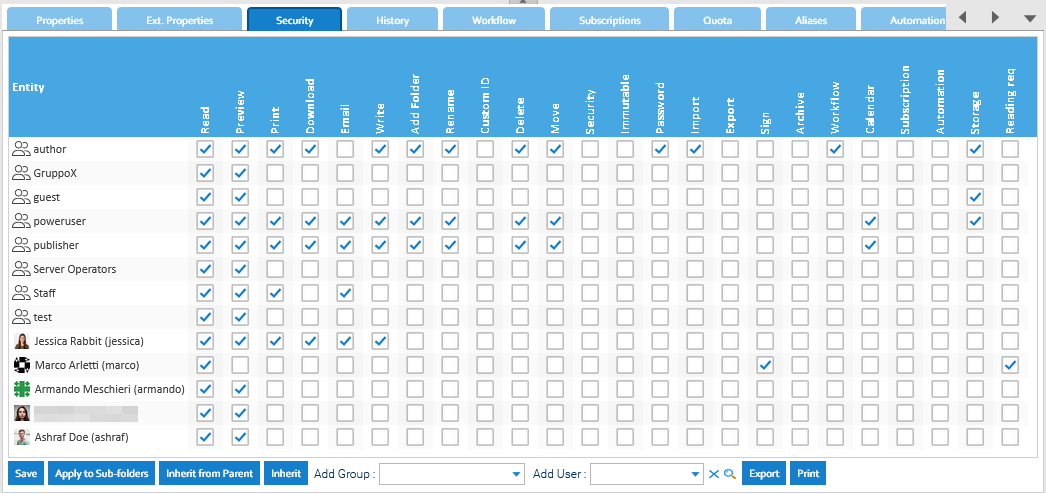
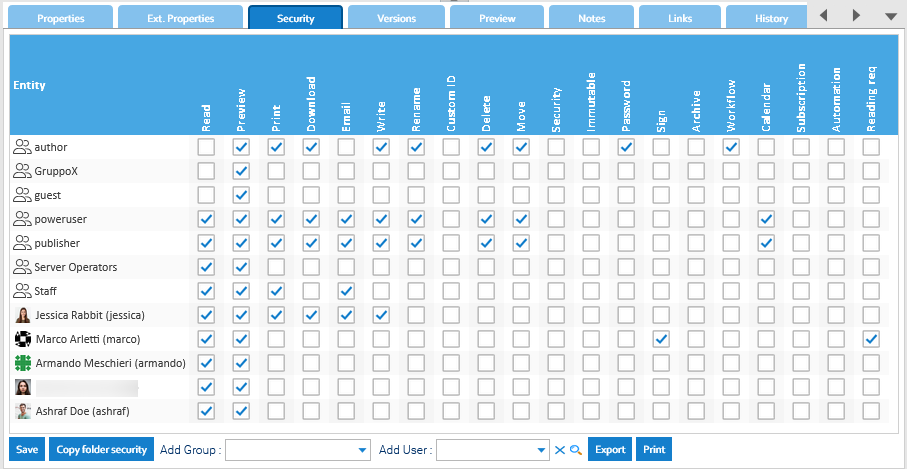
Setting up document's security policies
If you have the Security permission in a document, you can access the Security tab of the details panel.