workflow is required, and designer is required
used to visually model your business processes (workflow templates) without having to install additional software. The workflow designer is available in Administration > Document metadata > Workflow
To add a new Task in your workflow template, click the on Add Task button in the toolbar and a new square appears into the design panel. By default, it is a blue square, if you want to make it your initial task, just double click over it and select the...
If you have the Workflow permission in the current folder, you can manually start a workflow, simply by selecting the items from the documents list grid and clicking on the Start workflow icon. The system asks you to choose one of the available...
can also be used to have the document reviewed without a life cycle state change. Your workflows can be created in the Workflow designer integrated in the LogicalDOC application. Users who are involved in workflows are alerted by email. They can have a...
it is necessary to launch two or more tasks at the same time, that's why the Fork primitive is available in the workflow designer. You can insert a Fork by clicking on Add Fork button. Basically, a fork is a special task that automatically starts two or...
At any given moment any workflow instance has one status, that is the currently executing task. When the workflow starts the status is the initial task you have declared in the template designer, that the status changes according with the transitions...
[lightbox2 title="Report Parameter" data-caption="Workflow Designer"...
To add a new Task in your workflow template, click the on Add Task button in the toolbar and a new square appears into the design panel. By default, it is a blue square, if you want to make it your initial task, just double click over it and select the...
If you have the Workflow permission in the current folder, you can manually start a workflow, simply by selecting the items from the documents list grid and clicking on the Start workflow icon. The system asks you to choose one of the available...
can also be used to have the document reviewed without a life cycle state change. Your workflows can be created in the Workflow designer integrated in the LogicalDOC application. Users who are involved in workflows are alerted by email. They can have a...
it is necessary to launch two or more tasks at the same time, that's why the Fork primitive is available in the workflow designer. You can insert a Fork by clicking on Add Fork button. Basically, a fork is a special task that automatically starts two or...
At any given moment any workflow instance has one status, that is the currently executing task. When the workflow starts the status is the initial task you have declared in the template designer, that the status changes according with the transitions...
[lightbox2 title="Report Parameter" title="Workflow Designer"...
To add a new Task in your workflow template, click the on Add Task button in the toolbar and a new square appears into the design panel. By default, it is a blue square, if you want to make it your initial task, just double click over it and select the...
If you have the Workflow permission in the current folder, you can manually start a workflow, simply by selecting the items from the documents list grid and clicking on the Start workflow icon. The system asks you to choose one of the available...
can also be used to have the document reviewed without a life cycle state change. Your workflows can be created in the Workflow designer integrated in the LogicalDOC application. Users who are involved in workflows are alerted by email. They can have a...
it is necessary to launch two or more tasks at the same time, that's why the Fork primitive is available in the workflow designer. You can insert a Fork by clicking on Add Fork button. Basically, a fork is a special task that automatically starts two or...
At any given moment any workflow instance has one status, that is the currently executing task. When the workflow starts the status is the initial task you have declared in the template designer, that the status changes according with the transitions...
[lightbox2 title="Report Parameter">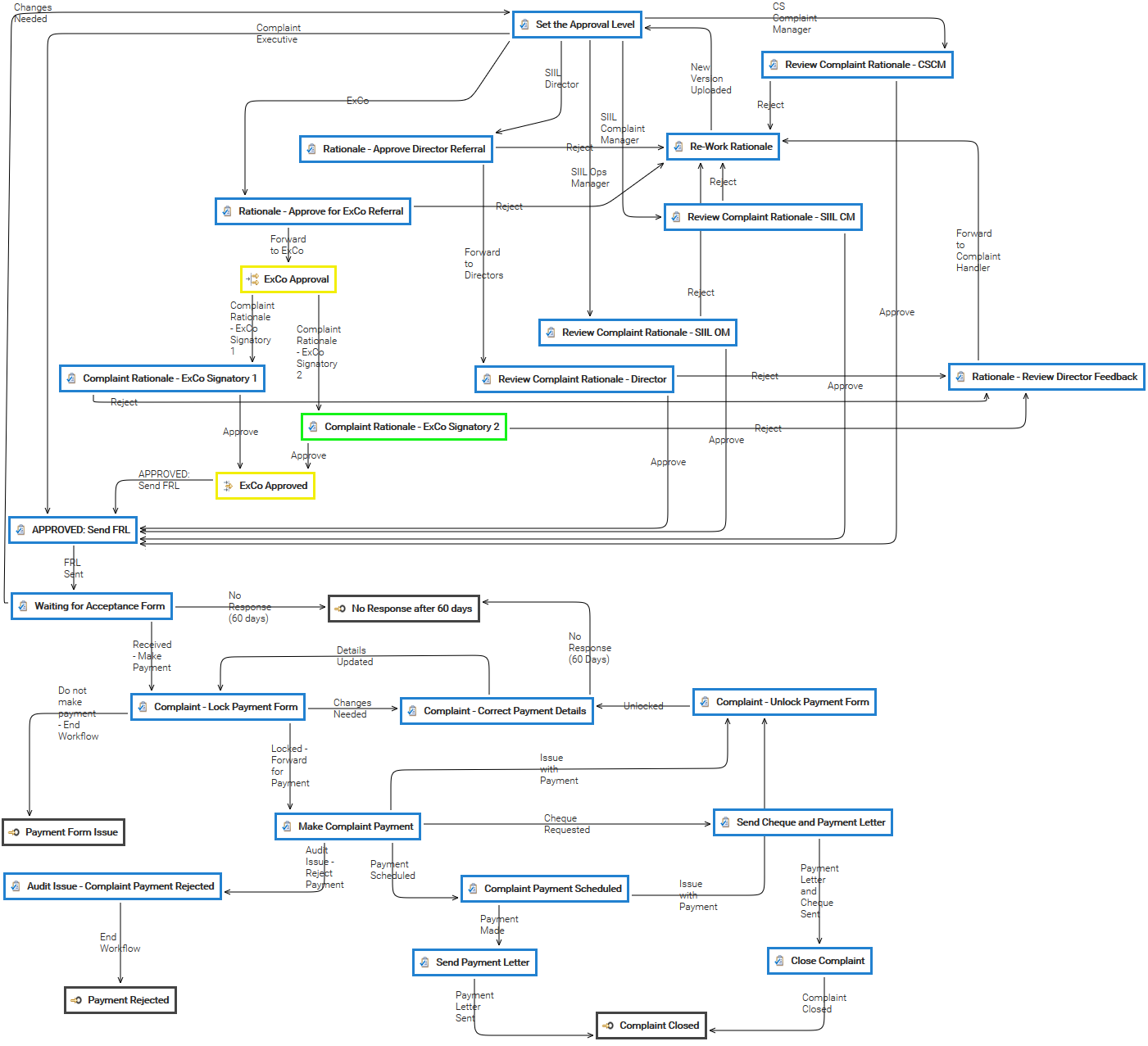 To add a new Task in your workflow template, click the on Add Task button in the toolbar and a new square appears into the design panel. By default, it is a blue square, if you want to make it your initial task, just double click over it and select the...
If you have the Workflow permission in the current folder, you can manually start a workflow, simply by selecting the items from the documents list grid and clicking on the Start workflow icon. The system asks you to choose one of the available...
can also be used to have the document reviewed without a life cycle state change. Your workflows can be created in the Workflow designer integrated in the LogicalDOC application. Users who are involved in workflows are alerted by email. They can have a...
it is necessary to launch two or more tasks at the same time, that's why the Fork primitive is available in the workflow designer. You can insert a Fork by clicking on Add Fork button. Basically, a fork is a special task that automatically starts two or...
At any given moment any workflow instance has one status, that is the currently executing task. When the workflow starts the status is the initial task you have declared in the template designer, that the status changes according with the transitions...
[lightbox2 title="Report Parameter" width="500">
To add a new Task in your workflow template, click the on Add Task button in the toolbar and a new square appears into the design panel. By default, it is a blue square, if you want to make it your initial task, just double click over it and select the...
If you have the Workflow permission in the current folder, you can manually start a workflow, simply by selecting the items from the documents list grid and clicking on the Start workflow icon. The system asks you to choose one of the available...
can also be used to have the document reviewed without a life cycle state change. Your workflows can be created in the Workflow designer integrated in the LogicalDOC application. Users who are involved in workflows are alerted by email. They can have a...
it is necessary to launch two or more tasks at the same time, that's why the Fork primitive is available in the workflow designer. You can insert a Fork by clicking on Add Fork button. Basically, a fork is a special task that automatically starts two or...
At any given moment any workflow instance has one status, that is the currently executing task. When the workflow starts the status is the initial task you have declared in the template designer, that the status changes according with the transitions...
[lightbox2 title="Report Parameter" width="500">
In a workflow designed to process the complaints, each rationale must be analyzed by different corporate figures and this...
The Tokens Detector is a specialized natural language model designed to identify and extract specific pieces of information, called tokens, from within a sentence. It is used to detect structured data like IDs, names, dates, or codes embedded in...



