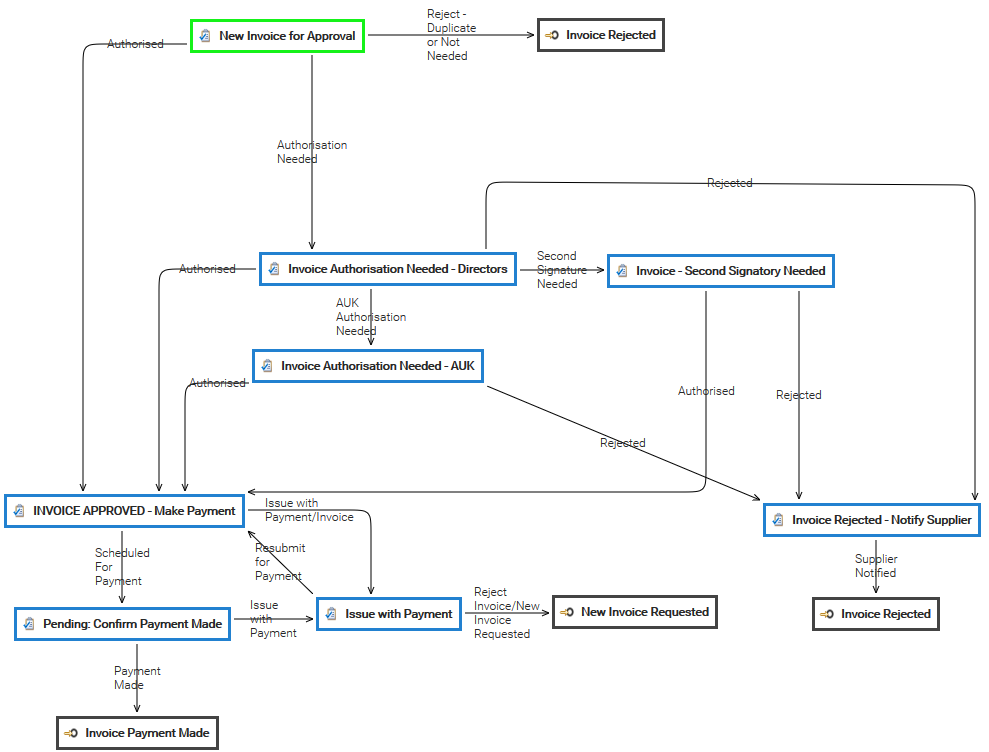
workflow is required
Launch a workflow on a selection of documents
If you have the Workflow permission in the current folder, you can manually start a workflow, simply by selecting the items from the documents list grid and clicking on the Start workflow icon. The system asks you to choose one of the available...Designing a Workflow
To add a new Task in your workflow template, click the on Add Task button in the toolbar and a new square appears into the design panel. By default, it is a blue square, if you want to make it your initial task, just double click over it and select the...Workflow
documents evolve according to a defined life cycle. There are different ways that this can be done. One option is to use a workflow. A workflow is a process in which a chain of users is defined to review, approve or reject a document. Workflows are...Workflow triggers
Workflows can be automatically started when documents are created into a specific folder. If you have the Workflow permission in the current folder, you can configure the automatic workflow execution. In the Workflow tab of the folder's properties...Creation
Into the [Workflow] panel you can create and configure a new workflow template. Clicking on [New Workflow Template] you can configure a new workflow template. The workflow settings consists of: Name Description Task-Assignment Reminder Supervisor In...Completing a Task
are a participant has to be completed, you receive a notification by email. You can see all the details of the job in the Workflow section of the Dashboard. Here you find three dashlets that show: tasks assigned to you directly tasks which you can take...Workflow Elements
Each workflow is composed by several tasks connected by transitions. In the designer, each task is drawn as a box with specific icon and color, and you can move them simply by dragging the object where you want in the drawing panel. To edit the...Automation
simple scripting language. Sometimes you wish LogicalDOC to execute your own logic when something special happens during a workflow or in reaction to specific events occurred inside the repository: with the Automation, you can inject your own algorithm...Workflow Status
At any given moment any workflow instance has one status, that is the currently executing task. When the workflow starts the status is the initial task you have declared in the template designer, that the status changes according with the transitions...Workflow History
In the Workflow section of the dashboard, click on History to access the complete history of all the workflow instances. In the Workflow selector, choose one of the entries to which you have access and optionally put a tag you are looking for and press...Object Detection
OCR can be applied only where needed, improving the accuracy of data extraction and enabling automated document-processing workflows. Typical applications include invoice processing, purchase order management, contract analysis, form processing, and the...Dashboard
screen offers several information services and utilities, including user statistics, tags, messages, calendar events, and workflow tasks. User This section shows statistical information about your system activities, including the list of last changed...Complaint Rationale
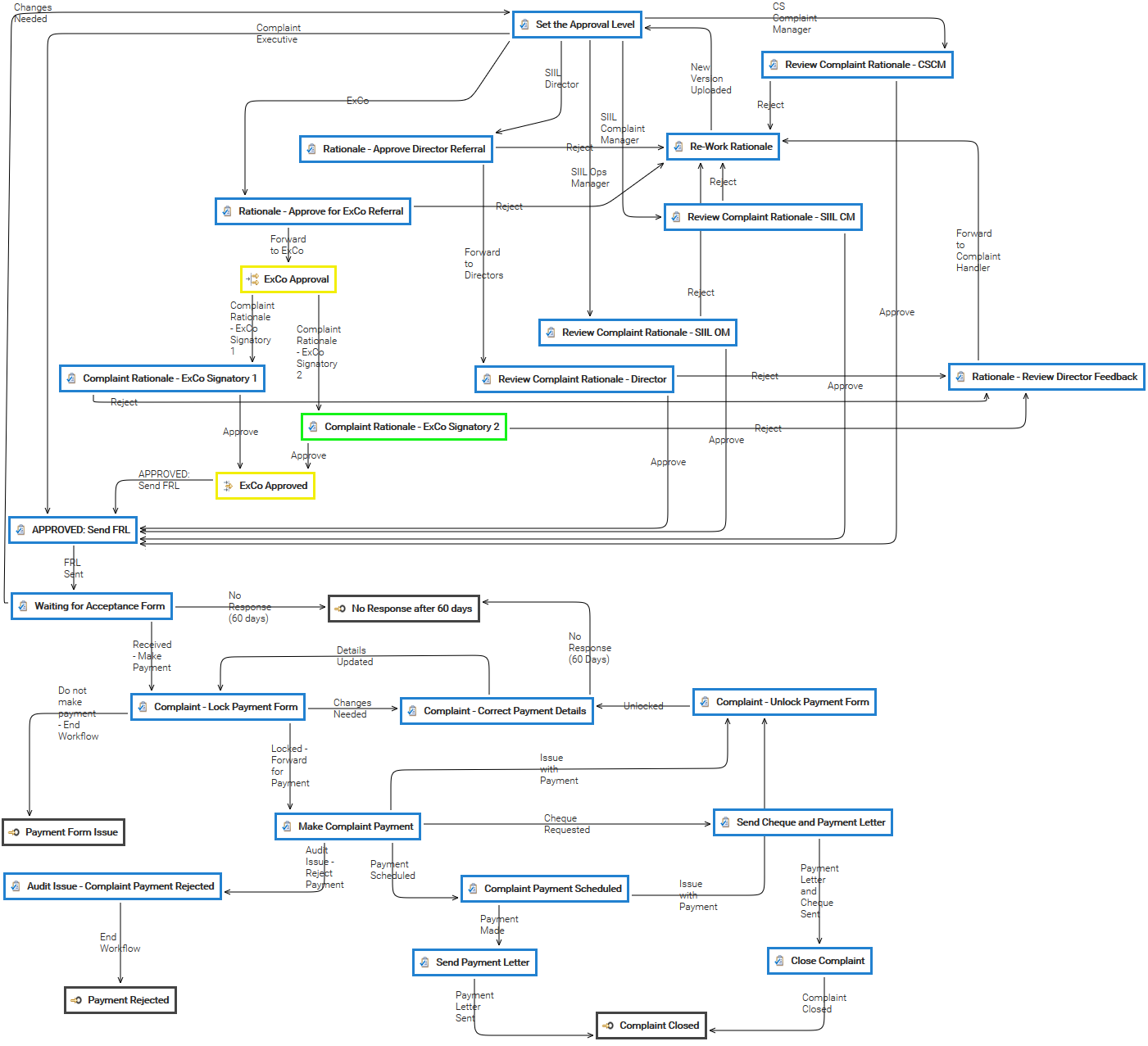
Parameters
events for the folders history.user.ttl: Time to live (expressed in days) of the recorded events for the users history.workflow.ttl: Time to live (expressed in days) of the recorded events for the workflows history.enabled: Enables the events recording...Invoice Approval