update is required
Recommended Update Procedure
directly access the Internet, you can configure a proxy server. If neither option is available, please follow the manual update guide. If you are a Cloud user, please refer to the dedicated cloud update guide. 1 Backup your...Manual Update Procedure
Use this procedure in case LogicalDOC cannot download the update packages from the Internet. 1 Backup your System [list style="uk-list"][li icon="far fa-check-square"]Read instructions on how to backup and restore [li...Updates
All the official update packages are available in this list; each update package brings the system from a version to another one. [lightbox2 title="Customer Portal - Updates" image="/images/stories/en/cportal/cportal-updates.png" width="500"...Update
to the previous version. Always do one upgrade at a time and at the end check that everything works before running another update. Do not try to apply several upgrades one after the other without checking if the system is running at each step. [/alert]High Availability and Disaster Recovery
can be synchronous because the redundant components are located in the LAN environment. Active and standby databases can be updated at the same time, enabling full, automatic and real-time recoveries to satisfy the most demanding RTOs and RPOs. As a...Recommended Patch Process
directly access the Internet, you can configure a proxy server. If neither option is available, please follow the manual update guide. 1 List of the available patches [list style="uk-list"][li icon="far...Editing the metadata of a document
click on it to confirm all the changes. It will result in a new minor version being saved with your modifications. Bulk update Sometimes you have to edit a set of documents with the same metadata, that is exactly what the Bulk update feature is designed...DocuSign
are signed by the signers, DocuSign closes the envelope and notifies LogicalDOC. When this happens, your files will be updated with their signer counterpart. Click on the Signed icon to download the signed agreementAutofill Using Fillers
the Filler drop-down list, and save. After that, you can click Process. The selected filler will analyze the document and update its properties accordingly. In the example, a Tag filler is selected, but any available filler can be used depending on the...Custom ID and Naming
documents. The rule is always applied when the document is created, but if you check the Evaluate at checkin or Evaluate at update you force the system to execute the rule again when the check-in or update operation is performed. The rule's scheme is...Install a Trained Model
and select the downloaded model. The model will appear in the list of the available models. 4 Update an Existing Model To update a pre-existing model, it sufficient to right-click on the model name in the Model Panel and...Install the Application on Ubuntu
Then edit the file /etc/init.d/logicaldoc-all adjusting the paths. Save the file and execute the commands: $ sudo update-rc.d logicaldoc-all defaults $ sudo service logicaldoc-all start Now you can access the program using the browser, pointing it to...Embedder
chunk size: minimum number of tokens and characters into a single chunk Alpha: the initial learning rate(the size of weight updates in a machine learning model during training), default is 0.025 Min Alpha: learning rate will linearly drop to min alpha...General Informations
is a mode of operation in the LogicalDOC system. Conventionally five runlevels exist: Default, Bulkload, Devel, Demo and updated. A runlevel defines the state of the LogicalDOC application after boot. For each runlevel you can specify which aspects are...Scheduled Tasks
expressions. Progress Status and Log If a task is running you can check the Progress column, the progression bar will be updated constantly showing the percentage of progress and an animated icon indicates that the process is running. This icon is...External Authentication
answer from the authentication server Synchronize if older than: number of hours after which the profile of local user is updated with the current data from the directory (0 means always synchronize, -1 means never synchronize) Keep membership in local...Key Store (Digital Signature)
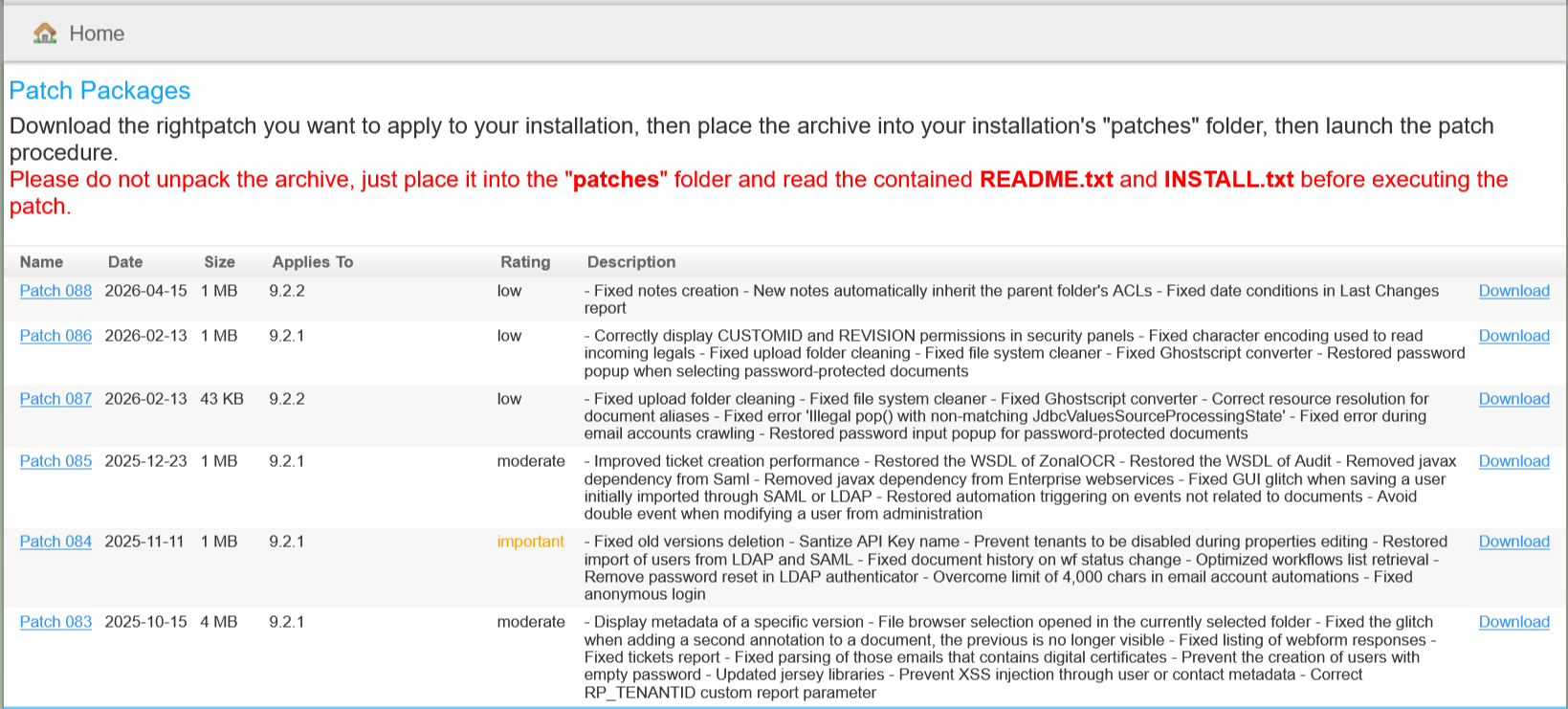
CAs. Root certificates are usually already present in popular PDF viewers and browsers, and if not, they can be updated automatically provided your software has been set up properly. CA-Signing vs Self-Signing If your local CA certificate was signed by...Patches
found on one or more versions. The exact list of fixes is available in the description. [lightbox2 title="Customer Portal - Updates" data-caption="Document...Autofill Using Fillers
the Filler drop-down list, and save. After that, you can click Process. The selected filler will analyze the document and update its properties accordingly. In the example, a Tag filler is selected, but any available filler can be used depending on the...Custom ID and Naming
documents. The rule is always applied when the document is created, but if you check the Evaluate at checkin or Evaluate at update you force the system to execute the rule again when the check-in or update operation is performed. The rule's scheme is...Install a Trained Model
and select the downloaded model. The model will appear in the list of the available models. 4 Update an Existing Model To update a pre-existing model, it sufficient to right-click on the model name in the Model Panel and...Install the Application on Ubuntu
Then edit the file /etc/init.d/logicaldoc-all adjusting the paths. Save the file and execute the commands: $ sudo update-rc.d logicaldoc-all defaults $ sudo service logicaldoc-all start Now you can access the program using the browser, pointing it to...Embedder
chunk size: minimum number of tokens and characters into a single chunk Alpha: the initial learning rate(the size of weight updates in a machine learning model during training), default is 0.025 Min Alpha: learning rate will linearly drop to min alpha...General Informations
is a mode of operation in the LogicalDOC system. Conventionally five runlevels exist: Default, Bulkload, Devel, Demo and updated. A runlevel defines the state of the LogicalDOC application after boot. For each runlevel you can specify which aspects are...Scheduled Tasks
expressions. Progress Status and Log If a task is running you can check the Progress column, the progression bar will be updated constantly showing the percentage of progress and an animated icon indicates that the process is running. This icon is...External Authentication
answer from the authentication server Synchronize if older than: number of hours after which the profile of local user is updated with the current data from the directory (0 means always synchronize, -1 means never synchronize) Keep membership in local...Key Store (Digital Signature)
CAs. Root certificates are usually already present in popular PDF viewers and browsers, and if not, they can be updated automatically provided your software has been set up properly. CA-Signing vs Self-Signing If your local CA certificate was signed by...Patches
found on one or more versions. The exact list of fixes is available in the description. [lightbox2 title="Customer Portal - Updates" title="Document...Autofill Using Fillers
the Filler drop-down list, and save. After that, you can click Process. The selected filler will analyze the document and update its properties accordingly. In the example, a Tag filler is selected, but any available filler can be used depending on the...Custom ID and Naming
documents. The rule is always applied when the document is created, but if you check the Evaluate at checkin or Evaluate at update you force the system to execute the rule again when the check-in or update operation is performed. The rule's scheme is...Install a Trained Model
and select the downloaded model. The model will appear in the list of the available models. 4 Update an Existing Model To update a pre-existing model, it sufficient to right-click on the model name in the Model Panel and...Install the Application on Ubuntu
Then edit the file /etc/init.d/logicaldoc-all adjusting the paths. Save the file and execute the commands: $ sudo update-rc.d logicaldoc-all defaults $ sudo service logicaldoc-all start Now you can access the program using the browser, pointing it to...Embedder
chunk size: minimum number of tokens and characters into a single chunk Alpha: the initial learning rate(the size of weight updates in a machine learning model during training), default is 0.025 Min Alpha: learning rate will linearly drop to min alpha...General Informations
is a mode of operation in the LogicalDOC system. Conventionally five runlevels exist: Default, Bulkload, Devel, Demo and updated. A runlevel defines the state of the LogicalDOC application after boot. For each runlevel you can specify which aspects are...Scheduled Tasks
expressions. Progress Status and Log If a task is running you can check the Progress column, the progression bar will be updated constantly showing the percentage of progress and an animated icon indicates that the process is running. This icon is...External Authentication
answer from the authentication server Synchronize if older than: number of hours after which the profile of local user is updated with the current data from the directory (0 means always synchronize, -1 means never synchronize) Keep membership in local...Key Store (Digital Signature)
CAs. Root certificates are usually already present in popular PDF viewers and browsers, and if not, they can be updated automatically provided your software has been set up properly. CA-Signing vs Self-Signing If your local CA certificate was signed by...Patches
found on one or more versions. The exact list of fixes is available in the description. [lightbox2 title="Customer Portal - Updates">