notifications is required
Adding new documents
In LogicalDOC, there are a variety of ways that a user can upload documents. The options are described below. It is important to remember that the user must select a folder with write permission to be able to create new documents. [alert...Parameters
In general, you configure LogicalDOC by accessing dedicated configuration sections inside the administration. However, there is a set of fine-tuning parameters collected in a single form located in the section Administration > Settings > Parameters...DocuSign
DocuSign allows organizations to manage electronic agreements and offers eSignature, a way to sign electronically on different devices. Signatures processed by DocuSign are compliant with the US ESIGN Act and the European...Automation
The Automation is a pervasive aspect of the LogicalDOC platform and represents the way you have to program things using a simple scripting language. Sometimes you wish LogicalDOC to execute your own logic when something special happens during a...Workflow Designer
by e-mail on task assignments and remind them to complete the work. The e-mail templates used by the workflow for these notifications are named wf.assign and wf.remind, and you can find them in Administration > Settings > Outgoing Email > Message...Web Forms
the responses are saved as extended attributes. In the Responses tab, you see all the responses received by the system. Notifications You may ask LogicalDOC to notify a set of users when new responses has been received. Statistics LogicalDOC also...Scheduled Tasks
of processing. In such cases, the progress bar does not indicate the progression rate and stays undetermined [/alert] Notifications You may ask LogicalDOC to send an activity report to a selection of users. Jobs The scheduled tasks are not the only...Outgoing Email
In order to allow LogicalDOC to send emails, you have to connect the application to your SMTP mail server. Into the Outgoing Email section, you can configure the outgoing mail server parameters. Protocol: you can choose between standard SMTP or SMTP...Completing a Task
Anytime a new task in which you are a participant has to be completed, you receive a notification by email. You can see all the details of the job in the Workflow section of the Dashboard. Here you find three dashlets that show: tasks assigned to you...Archive Viewer
The system provides to you the Archive Viewer application. It allows you to verify any archive finalized by the system. This application has three functionalities: Verify: archive verification Browse: listing of all documents inside an archive Search:...Dropbox
LogicalDOC integration with Dropbox allows you to import and export documents and folders between both applications. Authorization The first time you import or export with LogicalDOC, an authorization wizard will appear to guide you through the...ShareFile
LogicalDOC integration with ShareFile allows you to import and export documents and folders between both applications. ShareFile integration appears in LogicalDOC as an entry in the Tools menu when whatever folder is...Alerts on document's events
Alerts are emails automatically sent to users when an event occurs in a document. Users can follow the activity of a document, which means that they will receive an alert when an event occurs on the document itself. Subscribing to alerts You can...Alerts on folder's events
Alerts are emails automatically sent to users when an event occurs in a folder. Users can follow the activities inside a folder. Subscribing to alerts You can subscribe to a folder or all the subtree by right-clicking on the folder and then selecting...Creation
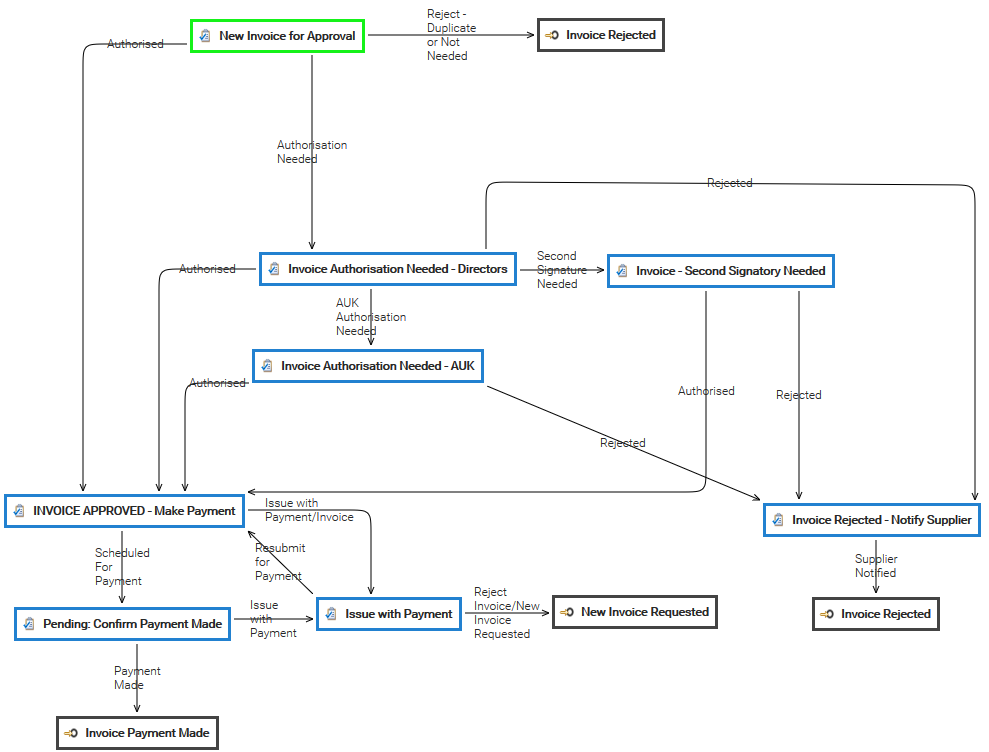
Into the [Workflow] panel you can create and configure a new workflow template. Clicking on [New Workflow Template] you can configure a new workflow template. The workflow settings consists of: Name Description Task-Assignment Reminder Supervisor In...Designing a Workflow
To add a new Task in your workflow template, click the on Add Task button in the toolbar and a new square appears into the design panel. By default, it is a blue square, if you want to make it your initial task, just double click over it and select the...Workflow
All the documents evolve according to a defined life cycle. There are different ways that this can be done. One option is to use a workflow. A workflow is a process in which a chain of users is defined to review, approve or reject a document. Workflows...Quota
With the quota, you can put limits in the usage of your system or specific tenants. The form below shows the actual usage for the different resources, and you can optionally put limitations. LogicalDOC guarantees that the system will not go over the...Invoice Approval