notes is required
Completing a Task
documents to add, you can also use the current content of the clipboard by clicking on Add documents from clipboard. Leave notes If you open the Notes tab, you will see notes left by other colleagues involved in the same workflow, and you also can leave...Designing a Workflow
To add a new Task in your workflow template, click the on Add Task button in the toolbar and a new square appears into the design panel. By default, it is a blue square, if you want to make it your initial task, just double click over it and select the...Recommended Update Procedure
size="h3" style="underline"] Carefully read the Update Notes[/heading] Before running the update you must carefully read the Update Notes that display important information you must be aware of and also indicate...Update Procedure for the Cloud
size="h3" style="underline"] Carefully read the Update Notes[/heading] Before running the update, you must carefully read the Update Notes that display important information you must be aware of and also...Import Archives
Into the [Import Archives] panel, you can configure the import from archives. Import Archives Into the [Import Archives] tab, you can see all the archives already imported or that are still waiting to be imported into the system. For each archive, are...Export Archives
This panel displays the list of all archives previously created with the following information: Creation date Name Type Size Status User that has created the archive User that has closed the archive Path on the server where the archive has been created...Manual Update Procedure
size="h3" style="underline"] Carefully read the Update Notes[/heading] Before running the update you must carefully read the Update Notes that display important informations you must be aware of and also...Dashlets
document events: you must use a query to retrieve a list of events (use the automation syntax to make the query dynamic) notes: you must use a query to retrieve a list of notes (use the automation syntax to make the query dynamic) custom content: you...Configure SAML with Microsoft ADFS
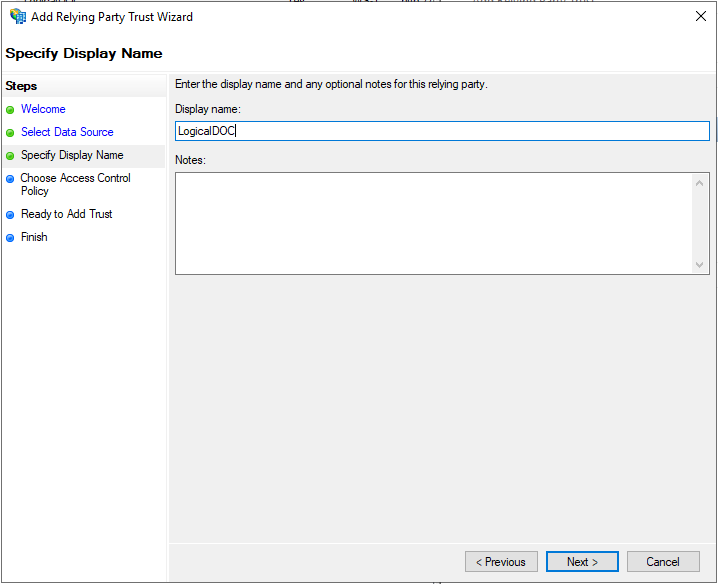
width="500" group=""/] On the Specify Display Name screen, enter a Display Name (e.g., LogicalDOC). You can add optional notes.