Each time a document is changed, the current version is saved, and a new one is generated that becomes the actual version. You can inspect all past versions in the Versions tab. Version and File Version In reality, two versions are maintained: the...
title="LogicalDOC Data Source" image="/images/stories/en/comparation.gif" width="500" group=""/] Compare different versions You can compare two different versions of the same document. In the Versions tab just select two versions and in the context menu...
we suggest you to frequently save your work. [/alert] Deploying the workflow template In order to publish the actual version of your workflow and make it available for normal operations, you need to deploy it. To do this, select the workflow template...
will also unlock the document so that other users will be able to edit it. Each time that you check in content, a new version is automatically created. All the past versions of the document are accessible in the Versions tab and available for download,...
source Unique identifier of the remote folder to monitor target Full path of the local folder that will receive the export versioning true = all the versions are exported; false = just the last version is exported filealias true = file aliases are...
inside this folder, if blank the default storage will be used Tag: you can tag the folder with one or more tags Max versions: only on a workspace, you can define the maximum number of versions retained for each document Specifying custom metadata at...
A comparator is a component able to compare the contents of two files of the same format or different versions of the same document. In the Associations section, you can choose what comparator to use for a specific format. The drop-down list only shows...
the users digest.batch: Max. number of documents processed at each run by the Digest Processor scheduled task document.maxversions: Max. number of versions maintained by the system for each document document.startversion: Initial version assigned to the...
menu to see the session details. It is important to note that the events listed here are something different than the versions; infact the majority of events does not produce a new revision fo the document, for instance when a document gets downloaded...
ID: optional field you can use to provide your unique identifier Revision: optional field you can use to provide your own version Language: indicates the language in which the document is written, which is necessary for the indexing algorithm Tag: you...
This procedure is dedicated to on-premise users and requires LogicalDOC to have Internet access. If you are running an old version of the software or if LogicalDOC cannot directly access the Internet, you can configure a proxy server. If neither option...
more vector store providers will be made available. It is therefore required to insert the connection details to a MariaDB (version 11.8 or greater) database; you may use the wizard icon to get some help in composing the connection Url. [alert...
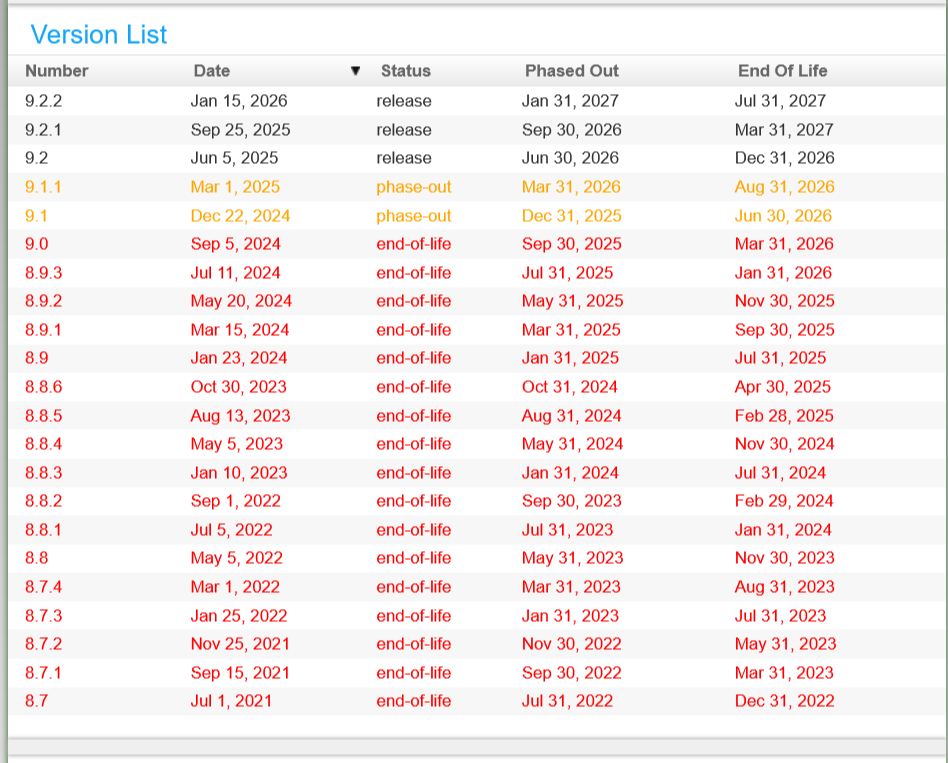
Our product is constantly improving, so each new version has a number of feature enhancements as well as issues resolved. We spend a lot of time making sure that upgrades are painless, however because of the large variety of configurations and...
maximum number of elements returned when the client asks for the change log WebDAV Web-based Distributed Authoring and Versioning is a long-standing protocol that enables a webserver to act as a fileserver and support collaborative authoring of content...
applied to all imported documents On update: choose if you want to import modifications done in the original files as new versions of the same documents or as new documents Delete File after Import: each successfully imported file is deleted from the...
In addition to these identity providers, you can also configure SAML for a custom IdP. It is important that you test new versions of LogicalDOC in a staging environment to confirm it will work with your identity provider. [alert...
style="underline"] Recommended procedure to upload a file[/heading] In the recent Android versions it is forbidden to access the device's file system directly, so if you want to upload a new file we suggest you to tap on...
Intra-release patches are available in this list; each patch is designed to correct problems found on one or more versions. The exact list of fixes is available in the description. [lightbox2 title="Customer Portal - Updates"...