




see is required
Configure SAML with Okta
statements used to map attributes between Okta and LogicalDOC. For more information on which attributes are configurable, see our documentation on SAML configuration settings. Email and username attributes are required.Attribute Sets
Add attribute set button, and then it is sufficient to specify a unique name. Moreover, you can select an existing set to see all the associated attribute definitions. On the right side of the Properties panel you can define a new attribute by filling...Positional Barcode Templates
to process the second barcode, and so on. Add a Pattern To add a pattern, click on the Append Pattern button, and you will see another row in the grid below. Now double-click in the Pattern's cell to start the editing mode. The pattern is composed by...Zonal Barcode Templates
be used as the sample to visually define the zones. Add a Zone To define a zone, click on the Add Zone button, and you will see a new yellow area displayed on the sample. You can move it over the barcode and adapt it to cover its dimensions. Once you...Connect Microsoft 365 mail server
connect Disable the option Use user's email as sender In Client ID and Tenant ID put the values from the App details as you see in the Azure portal [lightbox2 title="App Details" data-caption="Okta Panel"...Attribute Sets
Add attribute set button, and then it is sufficient to specify a unique name. Moreover, you can select an existing set to see all the associated attribute definitions. On the right side of the Properties panel you can define a new attribute by filling...Positional Barcode Templates
to process the second barcode, and so on. Add a Pattern To add a pattern, click on the Append Pattern button, and you will see another row in the grid below. Now double-click in the Pattern's cell to start the editing mode. The pattern is composed by...Zonal Barcode Templates
be used as the sample to visually define the zones. Add a Zone To define a zone, click on the Add Zone button, and you will see a new yellow area displayed on the sample. You can move it over the barcode and adapt it to cover its dimensions. Once you...Connect Microsoft 365 mail server
connect Disable the option Use user's email as sender In Client ID and Tenant ID put the values from the App details as you see in the Azure portal [lightbox2 title="App Details" title="Okta Panel"...Attribute Sets
Add attribute set button, and then it is sufficient to specify a unique name. Moreover, you can select an existing set to see all the associated attribute definitions. On the right side of the Properties panel you can define a new attribute by filling...Positional Barcode Templates
to process the second barcode, and so on. Add a Pattern To add a pattern, click on the Append Pattern button, and you will see another row in the grid below. Now double-click in the Pattern's cell to start the editing mode. The pattern is composed by...Zonal Barcode Templates
be used as the sample to visually define the zones. Add a Zone To define a zone, click on the Add Zone button, and you will see a new yellow area displayed on the sample. You can move it over the barcode and adapt it to cover its dimensions. Once you...Connect Microsoft 365 mail server
connect Disable the option Use user's email as sender In Client ID and Tenant ID put the values from the App details as you see in the Azure portal [lightbox2 title="App Details">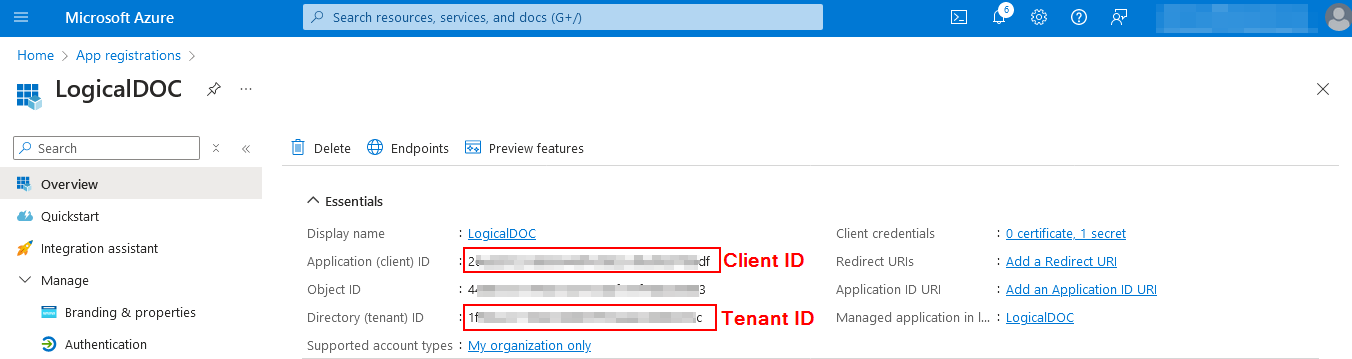
Attribute Sets
Add attribute set button, and then it is sufficient to specify a unique name. Moreover, you can select an existing set to see all the associated attribute definitions. On the right side of the Properties panel you can define a new attribute by filling...Positional Barcode Templates
to process the second barcode, and so on. Add a Pattern To add a pattern, click on the Append Pattern button, and you will see another row in the grid below. Now double-click in the Pattern's cell to start the editing mode. The pattern is composed by...Zonal Barcode Templates
be used as the sample to visually define the zones. Add a Zone To define a zone, click on the Add Zone button, and you will see a new yellow area displayed on the sample. You can move it over the barcode and adapt it to cover its dimensions. Once you...Connect Microsoft 365 mail server
connect Disable the option Use user's email as sender In Client ID and Tenant ID put the values from the App details as you see in the Azure portal [lightbox2 title="App Details" width="500">Connect Microsoft 365 emailbox
put: 993 In the Username field, put the same mailbox In Client ID and Tenant ID put the values from the App details as you see in the Azure portal