parameter is required
Automation
tenant dictionary Map map with all the variables(variable_name > value) keys Set set of all the keys in the dictionary parameters Map map with all the routine's invocation parameters(parameter_name > value) parametersnames Set set of all the routine's...Install on QNAP
Once the image gets downloaded, click on the icon Create container to create the container, the wizard will ask you the parameters, be sure to give the container name's logicaldoc-db:Install on Synology
Once the image gets downloaded, double-click on it to create the container, the wizard will ask you the parameters, be sure to give the container name's logicaldoc-db: [lightbox2 title="MariaDB container name"...Parameters
LogicalDOC by accessing dedicated configuration sections inside the administration. However, there is a set of fine-tuning parameters collected in a single form located in the section Administration > Settings > Parameters Please note that these are...Parameters
When your search is more concerned on the parameters of the document, you could use the Parametric Search feature. To perform this kind of search, you have to add as many conditions as you want on the document's metadata. It is possible to restrict the...Stamps
or groups to a stamp, open the Security tab and choose one or more elements in the Add User and Add Group drop-down lists. Parameters Sometimes you want a stamp that prints some information filled by the user at apply time. To cover this need, you may...Configuring DocuSign API access
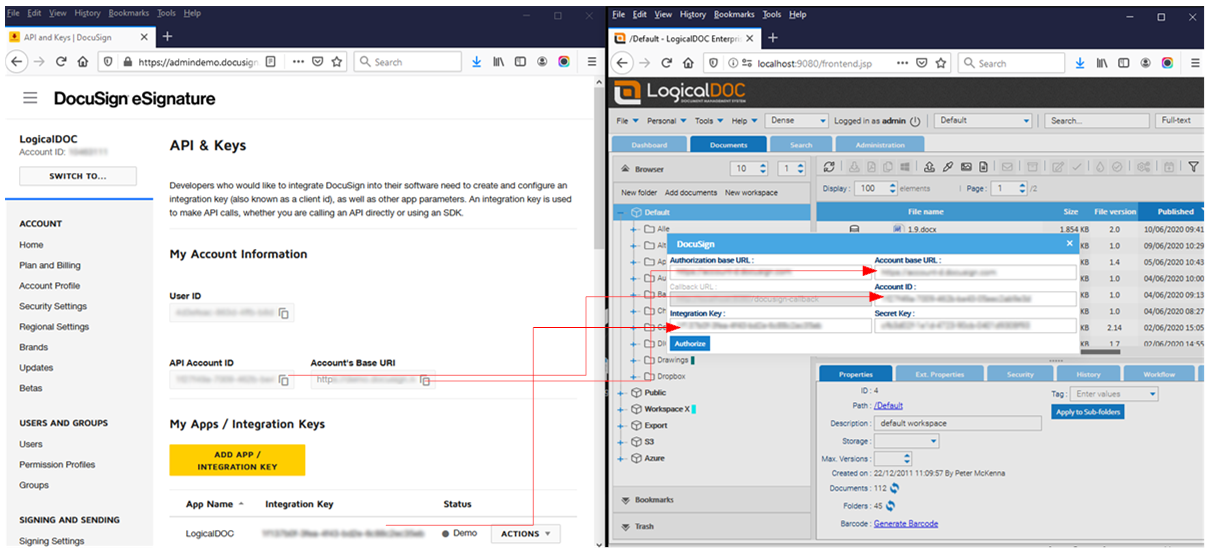
enter your DocuSign administration and click on the API and Keys link in the INTEGRATIONS menu. [lightbox2 title="Report Parameter" data-caption="MariaDB container creation"...Install on Synology
Once the image gets downloaded, double-click on it to create the container, the wizard will ask you the parameters, be sure to give the container name's logicaldoc-db: [lightbox2 title="MariaDB container name"...Parameters
LogicalDOC by accessing dedicated configuration sections inside the administration. However, there is a set of fine-tuning parameters collected in a single form located in the section Administration > Settings > Parameters Please note that these are...Parameters
When your search is more concerned on the parameters of the document, you could use the Parametric Search feature. To perform this kind of search, you have to add as many conditions as you want on the document's metadata. It is possible to restrict the...Stamps
or groups to a stamp, open the Security tab and choose one or more elements in the Add User and Add Group drop-down lists. Parameters Sometimes you want a stamp that prints some information filled by the user at apply time. To cover this need, you may...Configuring DocuSign API access
enter your DocuSign administration and click on the API and Keys link in the INTEGRATIONS menu. [lightbox2 title="Report Parameter" title="MariaDB container creation"...Install on Synology
Once the image gets downloaded, double-click on it to create the container, the wizard will ask you the parameters, be sure to give the container name's logicaldoc-db: [lightbox2 title="MariaDB container name"...Parameters
LogicalDOC by accessing dedicated configuration sections inside the administration. However, there is a set of fine-tuning parameters collected in a single form located in the section Administration > Settings > Parameters Please note that these are...Parameters
When your search is more concerned on the parameters of the document, you could use the Parametric Search feature. To perform this kind of search, you have to add as many conditions as you want on the document's metadata. It is possible to restrict the...Stamps
or groups to a stamp, open the Security tab and choose one or more elements in the Add User and Add Group drop-down lists. Parameters Sometimes you want a stamp that prints some information filled by the user at apply time. To cover this need, you may...Configuring DocuSign API access
enter your DocuSign administration and click on the API and Keys link in the INTEGRATIONS menu. [lightbox2 title="Report Parameter">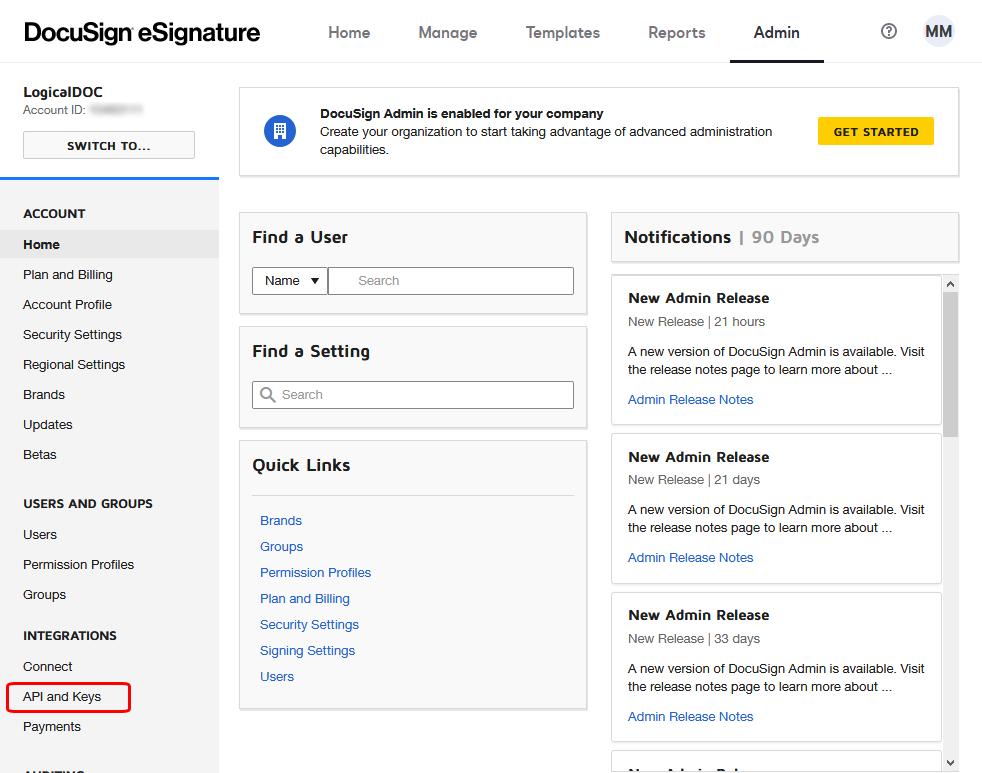
Install on Synology
Once the image gets downloaded, double-click on it to create the container, the wizard will ask you the parameters, be sure to give the container name's logicaldoc-db: [lightbox2 title="MariaDB container name"...Parameters
LogicalDOC by accessing dedicated configuration sections inside the administration. However, there is a set of fine-tuning parameters collected in a single form located in the section Administration > Settings > Parameters Please note that these are...Parameters
When your search is more concerned on the parameters of the document, you could use the Parametric Search feature. To perform this kind of search, you have to add as many conditions as you want on the document's metadata. It is possible to restrict the...Stamps
or groups to a stamp, open the Security tab and choose one or more elements in the Add User and Add Group drop-down lists. Parameters Sometimes you want a stamp that prints some information filled by the user at apply time. To cover this need, you may...Configuring DocuSign API access
enter your DocuSign administration and click on the API and Keys link in the INTEGRATIONS menu. [lightbox2 title="Report Parameter" width="500">External Authentication
Variable Java Class Description ldapUser LDAPUser the user being authenticated [/automation] To check if the connection parameters are correct, just click on Test Connection. Once you have connected the external directory, click on Save to make...Import Folders
You may have import folders of different types and depending on the type you have to provide different configuration parameters. When the import folder is processed, it replicates the same tree that starts from the Path of the source location to the...Outgoing Email
the application to your SMTP mail server. Into the Outgoing Email section, you can configure the outgoing mail server parameters. Protocol: you can choose between standard SMTP or SMTP Microsoft 365 Server: IP or hostname of your mail server Port:...LogicalDOC Export
command line: $ java -jar logicaldoc-export-installer.jar During the setup, you will be required to input the connection parameters to your LogicalDOC installation as well as the remote folder to monitor and the local target path. On Windows, after the...Adding new documents
Best practice is to distribute your documents among different folders. To enforce this best practice, a configurable parameter is provided at Administration > Settings > Parameters > maxdocsperfolder [/alert] Standard upload Click on the Add documents...Format Converters
The section Converters shows the list of all the installed converters, and some of them may require some configuration parameters. To configure a converter, just expand its row and open the configuration table. To change a specific parameter, just...Configuring ShareFile API access
the menu Tools > ShareFile > Authorize and paste the information from the key you just created.