

p is required

Downloading documents

In order to download a document or convert it to PDF format, you must have the Download permission. Download If you want to save a document in the local computer without making any changes, you can right-click on a document and select the Download...

Install on Linux

To install on Linux, please follow these steps: Prepare the Database Install third-party Software Install the LogicalDOC application [alert style="uk-alert-warning"][heading size="h3" style="underline"] Make...

Convert to different formats

Thanks to a configurable converter system, you can convert a document to another different format. To convert a document, just select it and click on the Convert icon of the toolbar. Then in the popup window you can select one of the available output...

Firewall

You can access and edit the Firewall preferences by going to Administration > Security > Firewall The Firewall allows administrators to restrict or allow access to the system based on: IP addresses Hostnames Network ranges (CIDR notation) When enabled,...

Move

From the documents list grid, select the documents you want to move and then select the [Cut] item of the context menu. This will put the current selection into the clipboard.

Advanced Operations on Folders

The [Documents] is the area you can access to manage your documents, here you can find a browser that let you navigate the folders tree like a PC disk.

Dashlets

A dashlet is a small window that appears in the user's dashboard. The purpose of a dashlet is to show useful information about the user's activities inside the system. Each user can customize his dashboard by placing a set of dashlets made available by...

Search in Folder

You can make an advanced search to look for documents inside a folder selecting it and clicking on the [Search] menu item. The system will display the full-text search functionality with the search already set on the selected folder.

Document History

All the events that happen on each single document are recorded and available inside the document's History tab. [lightbox2 title="History" data-caption="cut document"...

Advanced Operations on Folders

The [Documents] is the area you can access to manage your documents, here you can find a browser that let you navigate the folders tree like a PC disk.

Dashlets

A dashlet is a small window that appears in the user's dashboard. The purpose of a dashlet is to show useful information about the user's activities inside the system. Each user can customize his dashboard by placing a set of dashlets made available by...

Search in Folder

You can make an advanced search to look for documents inside a folder selecting it and clicking on the [Search] menu item. The system will display the full-text search functionality with the search already set on the selected folder.

Document History

All the events that happen on each single document are recorded and available inside the document's History tab. [lightbox2 title="History" title="cut document"...

Advanced Operations on Folders

The [Documents] is the area you can access to manage your documents, here you can find a browser that let you navigate the folders tree like a PC disk.

Dashlets

A dashlet is a small window that appears in the user's dashboard. The purpose of a dashlet is to show useful information about the user's activities inside the system. Each user can customize his dashboard by placing a set of dashlets made available by...

Search in Folder

You can make an advanced search to look for documents inside a folder selecting it and clicking on the [Search] menu item. The system will display the full-text search functionality with the search already set on the selected folder.

Document History

All the events that happen on each single document are recorded and available inside the document's History tab. [lightbox2 title="History">cut document
Advanced Operations on Folders

The [Documents] is the area you can access to manage your documents, here you can find a browser that let you navigate the folders tree like a PC disk.

Dashlets

A dashlet is a small window that appears in the user's dashboard. The purpose of a dashlet is to show useful information about the user's activities inside the system. Each user can customize his dashboard by placing a set of dashlets made available by...

Search in Folder

You can make an advanced search to look for documents inside a folder selecting it and clicking on the [Search] menu item. The system will display the full-text search functionality with the search already set on the selected folder.

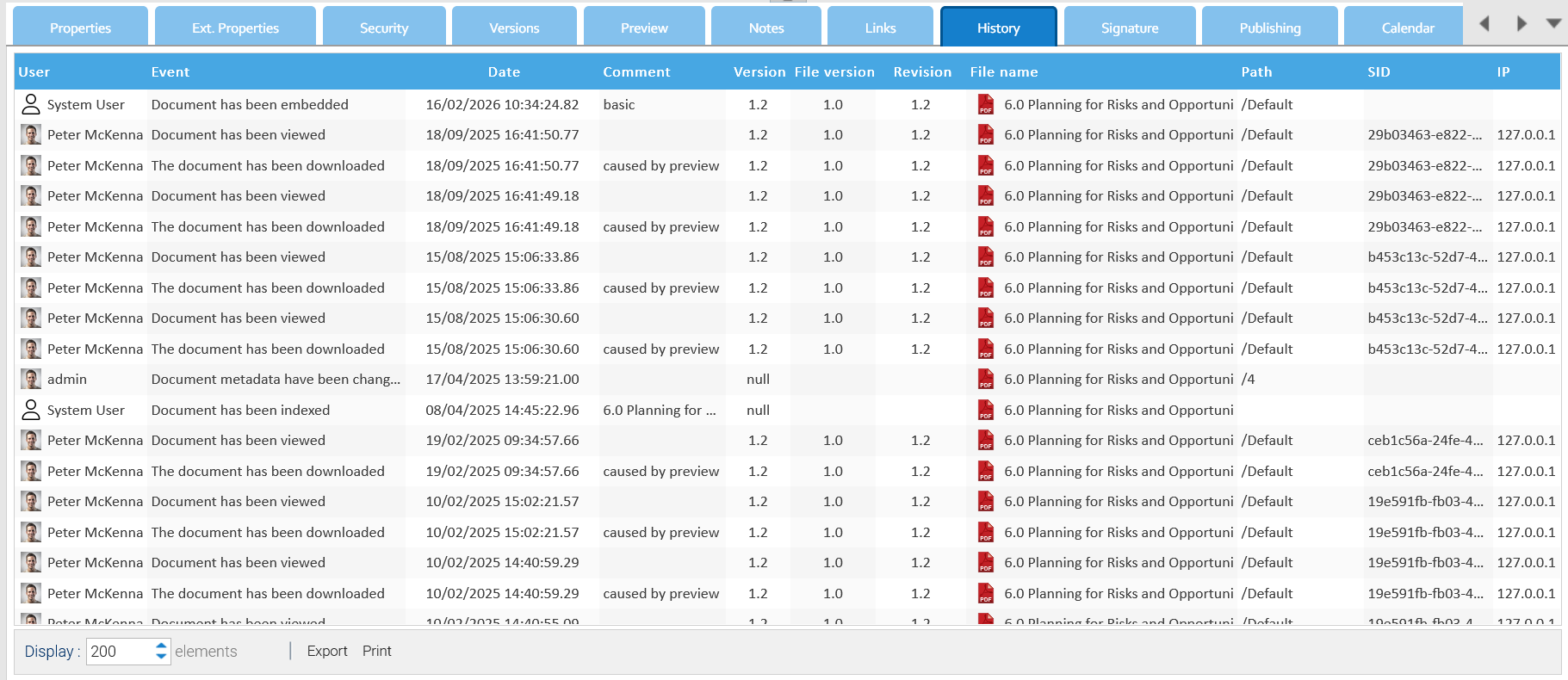
Document History

All the events that happen on each single document are recorded and available inside the document's History tab. [lightbox2 title="History" width="500">
Each record reports the...

Archived documents

This report shows you all the archived documents you have in the system, you can also select a folder to restrict the visualization to a specific partition of your repository. You can interact with the elements of the report by right-clicking on them...

Adding a Form

If you have the write permission in the current folder, you can create a new PDF document by filling the fields with one of the available forms. To do so, click on the Add a form icon and select one of the available forms. Click on Save to confirm, and...

Searching your documents

The LogicalDOC's search engine is the heart of the system. It allows quick access to the information when you need it. The fastest way to search for documents is to use the full-text search. At the top of the screen is the quick search box. You must...

Text and HTML Editor

A plain text editor is embedded in the application as well as an HTML visual editor so you can edit and create text and HTML files without having to leave LogicalDOC. The text editor is available in the menu Tools > Text content, while the HTML editor...

Data Isolation

Each tenant has its own data: users, folders, documents, templates... When a user logs in, he will operate inside his tenant in a complete isolation. LogicalDOC associates each username to a specific tenant, that's why you cannot use the same username...

Restoring a document

From the documents list in the trash panel, select the document you want to restore and then use the [Restore] item of the context menu. After that, the document will be restored, and it will appear in the current folder, if you have the write...

Alerts on document's events

Alerts are messages automatically sent to users when an event occurs in a document. Users can follow the activity of a document, which means that they will receive an alert when an event occurs on the document itself. Subscribing to alerts You can...

Alerts on folder's events

Alerts are emails automatically sent to users when an event occurs in a folder. Users can follow the activities inside a folder. Subscribing to alerts You can subscribe to a folder or all the subtree by right-clicking on the folder and then selecting...

Compare documents and versions

Thanks to a configurable comparison system, you can compare two documents of the same format. To compare two documents, just select them, then right click and in the context menu choose More > Compare. [lightbox2...

Deleted folders

This report shows you all the folders that were logically deleted, you can also filter by user and parent folder. You can interact with the elements of the report by right-clicking on them and choose one of the possible actions. When you choose to...

Hardware Bound License

A Hardware Bound License is tied to the hardware of the server where you installed LogicalDOC in. Licenses of this type are associated with a specific device upon activation and do not work on other computers. To check if you are using a license bound...