log is required
Install on Windows
To install on Windows, please follow these three steps: Prepare de Database Install third-party Software Install the LogicalDOC application [alert style="uk-alert-warning"][heading size="h3" style="underline"]...PowerPoint Addin
width="500" group="document"/] When the editing is completed, you must select the [LogicalDOC] tab and then click on [Save in LogicalDOC] button. The new document file is saved into the system and a new version of the document is stored into the...Administrator's Guide
LogicalDOC is an advanced system that allows you to handle a large volume of data. Once installed, you will be able to configure customize it in order to maximize the benefits from your installation. This manual is intended for use by the...ChatGPT
text like humans. It has been designed to process and generate natural text in several languages. With this AI connected with LogicalDOC, users can type a prompt or question about their documents. The first time you want to use ChatGPT from within...Designing a Workflow
extended attributes of the document currently involved in the workflow). In the Participants section of the task's dialog box you find a specific Attribute field, here write the name of a custom attribute of type User then press the plus icon to add...Two Factors Authentication (2FA)
Two-factor authentication is now recommended to secure login to Internet services and protect against phishing attacks and credential theft. This authentication generates two-step verification codes for the users on their devices, thereby increases the...Scheduled Tasks
to execute them regularly. Please look at the tutorial to discover the syntax of cron expressions. Progress Status and Log If a task is running you can check the Progress column, the progression bar will be updated constantly showing the percentage of...Install on Linux
To install on Linux, please follow these steps: Prepare the Database Install third-party Software Install the LogicalDOC application [alert style="uk-alert-warning"][heading size="h3" style="underline"] Make...Data Isolation
Each tenant has its own data: users, folders, documents, templates... When a user logs in, he will operate inside his tenant in a complete isolation. LogicalDOC associates each username to a specific tenant, that's why you cannot use the same username...Receive backup reports by Email
The LogicalDOC Backup can send to a list of recipients a report with the result of each elaboration. This keeps you updated on the status of the backup of your system without the need to periodically inspect the logs. To allow the tool to send you the...Profile
upload one of your photos. The Language is the most relevant setting because it defines the default language to use when you log in. User Interface In the tab User Interface, you customize some aspects of the interface. Welcome screen: the screen you...Updates
package, just click on it's name or on the download link. In order to download you have to read and confirm both the Clanges Log and the Release Notes:Patches
package, just click on it's name or on the download link. In order to download you have to read and confirm both the Changes Log and the Release Notes: [lightbox2 title="Customer Portal - Patch Download"...Searching your documents
The LogicalDOC's search engine is the heart of the system. It allows quick access to the information when you need it. The fastest way to search for documents is to use the full-text search. At the top of the screen is the quick search box. You must...Digitally signing a document
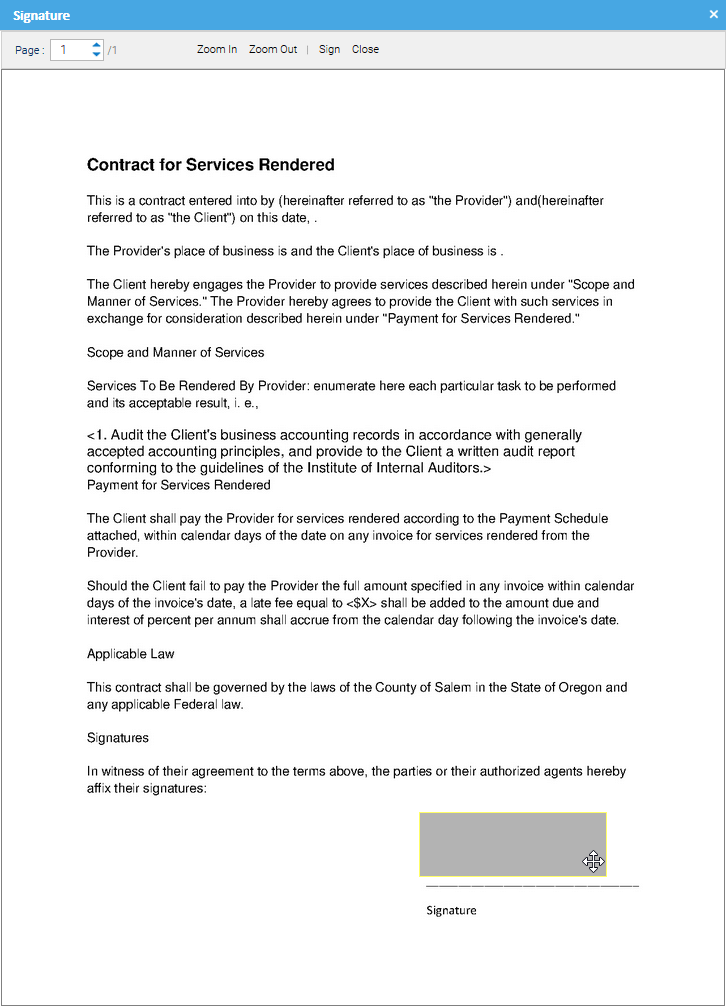
Visual positioning option, you will be asked to position and size the signature area inside the document. [lightbox2 title="LogicalDOC Data Source" data-caption="Customer Portal - Update Download"...Patches
package, just click on it's name or on the download link. In order to download you have to read and confirm both the Changes Log and the Release Notes: [lightbox2 title="Customer Portal - Patch Download"...Searching your documents
The LogicalDOC's search engine is the heart of the system. It allows quick access to the information when you need it. The fastest way to search for documents is to use the full-text search. At the top of the screen is the quick search box. You must...Digitally signing a document
Visual positioning option, you will be asked to position and size the signature area inside the document. [lightbox2 title="LogicalDOC Data Source" title="Customer Portal - Update Download"...Patches
package, just click on it's name or on the download link. In order to download you have to read and confirm both the Changes Log and the Release Notes: [lightbox2 title="Customer Portal - Patch Download"...Searching your documents
The LogicalDOC's search engine is the heart of the system. It allows quick access to the information when you need it. The fastest way to search for documents is to use the full-text search. At the top of the screen is the quick search box. You must...Digitally signing a document
Visual positioning option, you will be asked to position and size the signature area inside the document. [lightbox2 title="LogicalDOC Data Source">