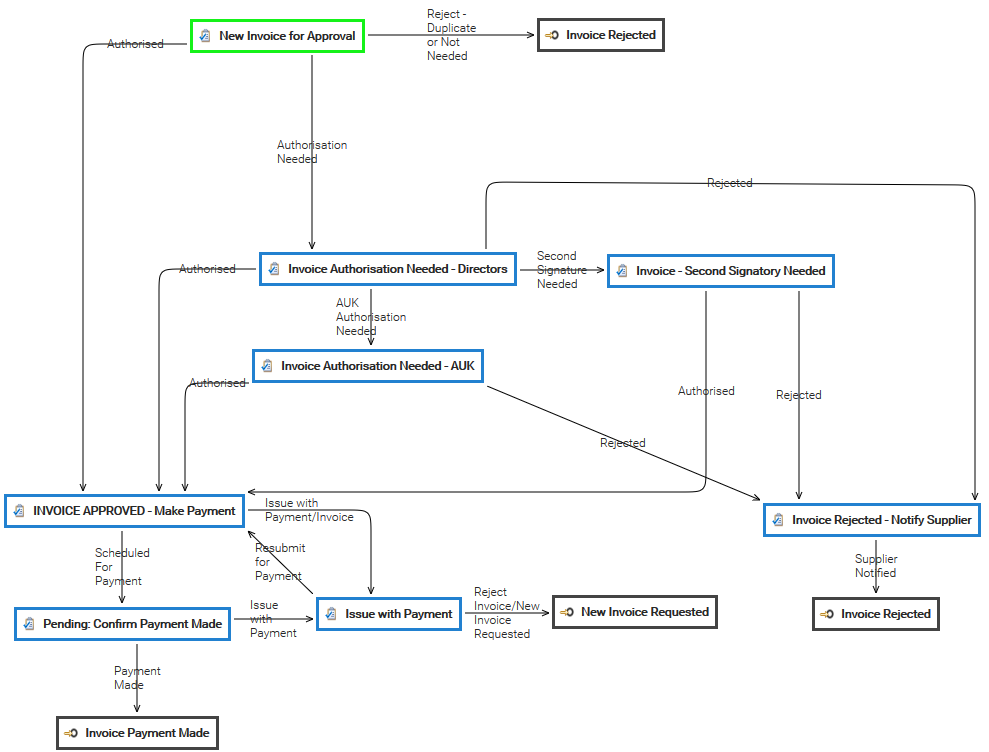
The Automation is a pervasive aspect of the LogicalDOC platform and represents the way you have to program things using a simple scripting language. Sometimes you wish LogicalDOC to execute your own logic when something special happens during a...
The Digital Signature feature adds PDF signing capabilities to the LogicalDOC Platform. It also provides generation of user certificates, which are required for document signing. LogicalDOC allows users to: download the PDF for previewing, download the...
Metadata is the basis of any modern record management system. LogicalDOC allows you to store the standard and custom metadata of your documents. To be able to edit the metadata, you will need the Write permission. Standard properties In the document's...
Stores The stores are containers that LogicalDOC uses to save the files of your documents, these containers are not human-readable and are handled exclusively by the system. You can define more stores by using the button Add Store. In order to change a...
Turn paper documents into full-text searchable digital files and manage them in a paperless document management system that incorporates advanced OCR software. Quickly and easily apply all the tools and functions of electronic document management to...
Each time a document is changed, the current version is saved, and a new one is generated that becomes the actual version. You can inspect all past versions in the Versions tab. Version and File Version In reality, two versions are maintained: the...
The Impersonation feature allows a user to operate on behalf of another user, provided that explicit authorization has been granted. This mechanism is useful where one user needs to act with the permissions and identity of another. Authorization Rules...
LogicalDOC handles the modifications of content through check-out/check-in cycles. However, these changes are only possible if you have the Write permission in the folder where the document is stored. The check-out operation locks the document so that...
To send a document as a mail attachment, first select a document. The next step is to select the Send by Email item from the context menu. It will be shown as an email composer in which you can insert the recipients that will receive your message....
The application is able to handle users authentication interacting with external systems in addition to the standard authentication. We can authenticate your users against ActiveDirectory and LDAP systems. Please enter the section Administration >...
# Instantiate a utility to handle IO #set($IOUtils = $ClassTool.newInstance("org.apache.commons.io.IOUtils")) # Instantiate a URL to the getInfo service of LogicalDOC #set($clazzUrl = $context.getClass().forName("java.net.URL")) #set($clazzString =...
A sampler is an object used to retrieve and prepare a dataset for the training of a model. You handle the samplers in Administration > Artificial Intelligence > Models > Samplers You can count on different types of samplers with different settings:...
An AI Model (or simply model) represents a program that has been trained on a set of data to recognize certain patterns or make certain decisions without further human intervention. You handle the models in Administration >...
A robot is an intelligent agent designed to understand user questions and provide meaningful answers. Robots act as an interface between the user and the Natural Language Processing (NLP) engine, using trained models to...
The purpose for this kind of clustering is to scale up the performances when the improvements on a single server would not be enough. A typical scenario is when you have a lot of concurrent users or very huge documents repository to index. LogicalDOC...
A set of behaviors and parameters of the user interface are configurable in the GUI Settings page. Welcome message: a message displayed to all the users when they sign in Preview window: percentage of the screen width occupied by the preview window...
A vector store indexes and stores vector embeddings (the vectorial representation of documents) for fast retrieval and semantic search. Embeddings are generated by AI models, in the context of machine learning these features represent different...
Embeddings are vectors representing entire documents or fragment of them into a continuous vector space. This numerical representation of is required to efficiently infer similitudes between documents and implement features like Semantic Search. This...
Here you can specify some general settings to handle the tags in your system. Input Mode: Free form or Preset Max. size: Maximum characters number for a single tag Min. size: Minimum characters number for a single tag Elements in tag selection: Maximum...