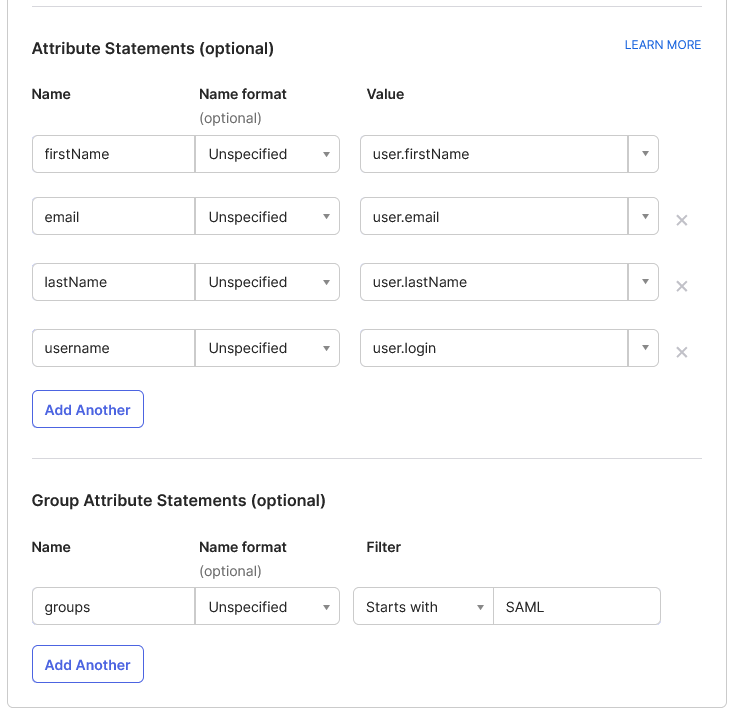
export is required
Export Folder as a Zip file
You can export whatever folder's tree as a Zip file, but you have to be granted the Export permission Just right-click on a folder and choose the Export to ZIP menu item.[icon...
Dropbox
LogicalDOC integration with Dropbox allows you to import and export documents and folders between both applications. Authorization The first time you import or export with LogicalDOC, an authorization wizard will appear to guide you through the...
Export Archives
First, you must close the archive, so right-click on the item and then select Close. Now the archive is ready to be exported. At the end of the scheduled task, Archive Builder the archive goes to the final status of Finalized and is ready to be copied...
Import and Export
Inside the [Import and Export] section of the Administration, you can perform all the configurations regarding import from local and remote folder, import from email accounts, creating of archives and importing from archives. You can also find format...
ShareFile
LogicalDOC integration with ShareFile allows you to import and export documents and folders between both applications. ShareFile integration appears in LogicalDOC as an entry in the Tools menu when whatever folder is...
AI Models
queries per month.
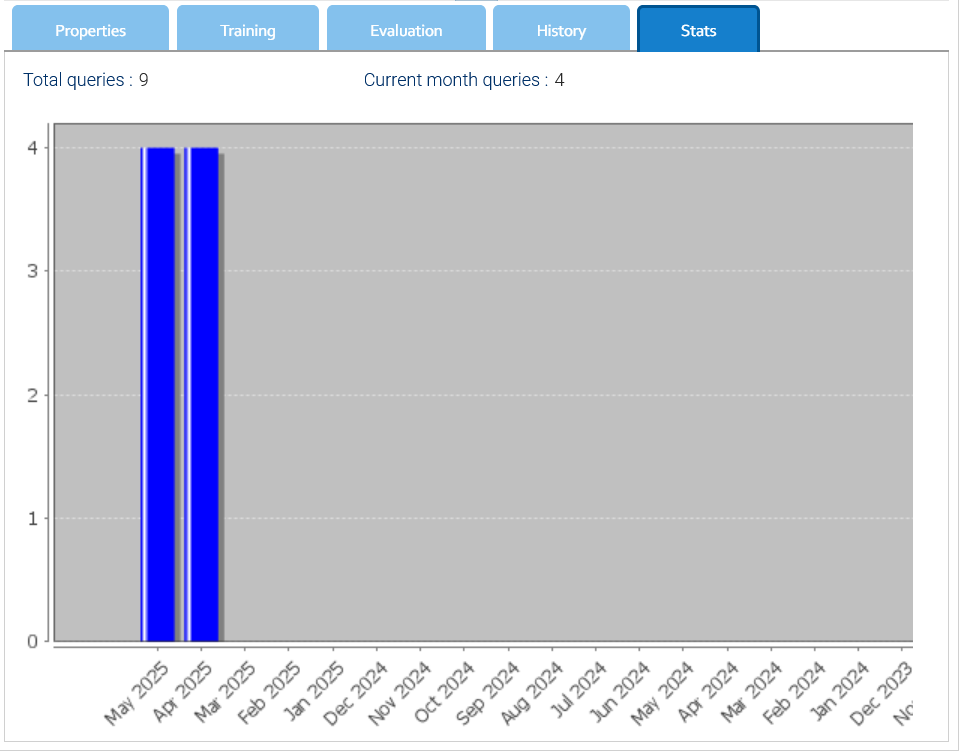 Export and Import Models can be exported and imported, this has been thought to allow you to prepare and train your models in a...
Google Drive
submenu, you can choose to edit text documents, calculation sheets, and presentations, create new documents, or import and export documents between LogicalDOC and Google Drive. The first time you want to use Google Drive from within LogicalDOC, you have...
Configure SAML with JumpCloud
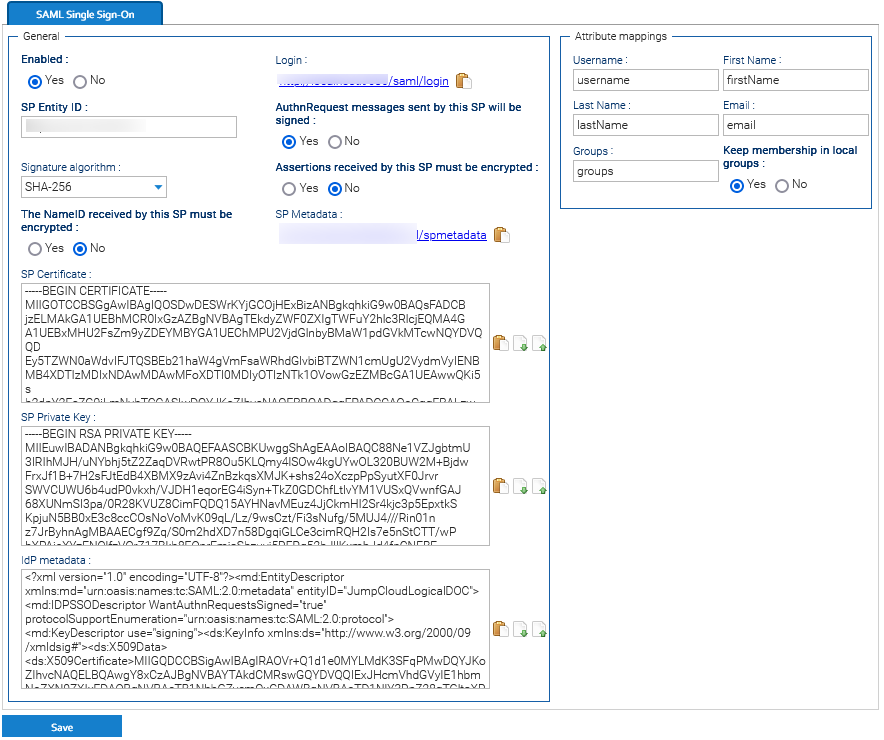 Export the Service Provider metadata file by clicking on the URL displayed in the SP Metadata field. You will then use this file in...
Setting up folder's security policies
you can edit the revision Import: the user can massively import files (e.g.: import from zip, import with DropSpot) Export: the user can export the folder's content as a .zip archive Sign: the documents can be digitally signed Archive: you can archive a...
Install the Application on Linux
> Settings > OCR Here, check if the path specified in path is correct. Enter the administration: Administration > Import & Export > Format Converters > LibreOfficeConverter Here, check if the path specified in path is correct. Enter the administration:...
Install the Application on Ubuntu
Here, check if the path specified in path is correct. Enter the administration: Administration > Import & Export > Format Converters > LibreOfficeConverter Here, check if the path specified in path is correct. Enter the administration: Administration >...
Configure SAML with Microsoft ADFS
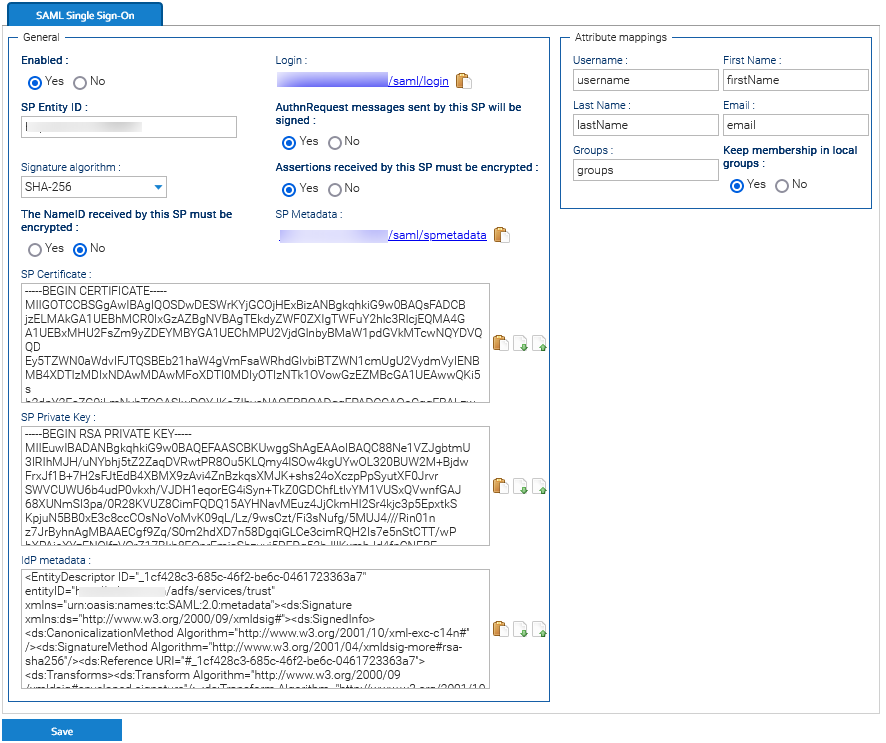 Export the Service Provider metadata file by clicking on the URL displayed in the SP Metadata field. You will then use this file in ADFS later....
Repositories
the use of this option when it is really necessary.
Dropbox
LogicalDOC integration with Dropbox allows you to import and export documents and folders between both applications. Authorization The first time you import or export with LogicalDOC, an authorization wizard will appear to guide you through the...Export Archives
First, you must close the archive, so right-click on the item and then select Close. Now the archive is ready to be exported. At the end of the scheduled task, Archive Builder the archive goes to the final status of Finalized and is ready to be copied...Import and Export
Inside the [Import and Export] section of the Administration, you can perform all the configurations regarding import from local and remote folder, import from email accounts, creating of archives and importing from archives. You can also find format...ShareFile
LogicalDOC integration with ShareFile allows you to import and export documents and folders between both applications. ShareFile integration appears in LogicalDOC as an entry in the Tools menu when whatever folder is...AI Models
queries per month.
Google Drive
submenu, you can choose to edit text documents, calculation sheets, and presentations, create new documents, or import and export documents between LogicalDOC and Google Drive. The first time you want to use Google Drive from within LogicalDOC, you have...Configure SAML with JumpCloud
Setting up folder's security policies
you can edit the revision Import: the user can massively import files (e.g.: import from zip, import with DropSpot) Export: the user can export the folder's content as a .zip archive Sign: the documents can be digitally signed Archive: you can archive a...Install the Application on Linux
> Settings > OCR Here, check if the path specified in path is correct. Enter the administration: Administration > Import & Export > Format Converters > LibreOfficeConverter Here, check if the path specified in path is correct. Enter the administration:...Install the Application on Ubuntu
Here, check if the path specified in path is correct. Enter the administration: Administration > Import & Export > Format Converters > LibreOfficeConverter Here, check if the path specified in path is correct. Enter the administration: Administration >...Configure SAML with Microsoft ADFS
Repositories
the use of this option when it is really necessary.Workflow Designer
the workflow from the system, click on Delete. This undeploys the workflow and also deletes the template from the system. Exporting and Importing Use the Export and Import buttons to download and upload the workflow scheme as xml file. The most common...Tesseract
$ ./make $ ./make install Post Installation Steps Some enviornments may need to setup following environment variable to be exported export LD_LIBRARY_PATH=/usr/local/lib The english language training data can be downloaded from...Backup Installation
style="underline"] MySQL Secure File Priv The LogicalDOC Backup must export your data into the temporary folder configured in the setting backup.db.dir, but if you are using MySQL or MariaDB, there is...Branding
You may also use an Automation code in the CSS definition instead of putting just static styles. Branding Packages You can export the actual branding by clicking on Export: a branding package will be downloaded as a compressed zip file. Inside the...Configure SAML with Okta
required.