e is required
Install the Application on Ubuntu
Get from the download website the setup file: installer-linux-.zip To install LogicalDOC unpack the zip archive, open a terminal window and execute the command from command line: $ java -jar logicaldoc-installer.jar If the system does not have a...Configuring Google API
You can create a connection between your Google account and LogicalDOC. This way, you will be able to use Google Cloud Applications like Drive, Calendar and Gmail from inside LogicalDOC. Third party applications can communicate with your Google account...Positional Barcode Templates
A positional barcode template is composed by an ordered list of patterns, each pattern indicates how to process the barcode. The barcodes are processed sequentially by reading the page from left to right and from top to bottom. The first pattern will...Adding an event to the Calendar
LogicalDOC allows you to add calendar events, the calendar is a useful tool to coordinate activities among your colleagues. Each event in the calendar may be associated to one or more documents, so select some documents and click on the toolbar icon...Semantic Search
Semantic search allows you to find documents based on meaning and intent, rather than word matches like full-text does. Instead of searching for literal occurrences of the words you type, the system analyzes the semantic similarity between the query...Install on Synology
Synology is a global producer of advanced and intelligent Network-Attached Storages (NAS). Find more information about Synology here: https://www.synology.com. [alert style="uk-alert-warning"][heading size="h3" style="underline"][icon style="fa...Zonal Barcode Templates
In a zonal template, you define the zones where the barcodes are located, and each zone is then elaborated using one or more provided recognition patterns. When you create a zonal pattern, you also upload an image or PDF...Setting up folder's security policies
If you have the Security permission in a folder, you can access the Security tab of the details panel.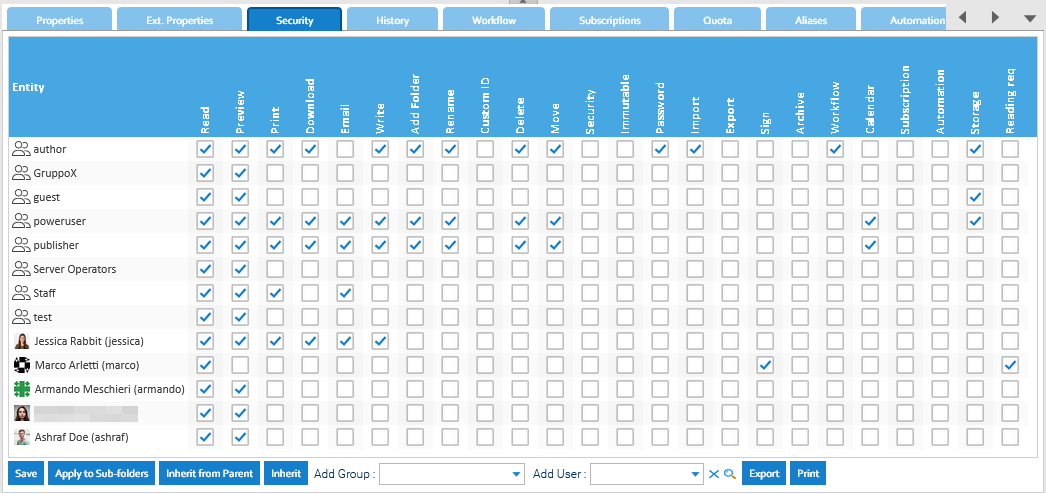
Connect Google Gmail emailbox
LogicalDOC can connect to Gmail in two ways: using a Google App Password or using OAuth 2.0 authentication. OAuth is the recommended, more secure method, but it requires additional setup in Google Cloud. For a simpler configuration, you can use an App...Tokens Detector
The Tokens Detector is a specialized natural language model designed to identify and extract specific pieces of information, called tokens, from within a sentence. It is used to detect structured data like IDs, names, dates, or codes embedded in...Automation
The Automation is a pervasive aspect of the LogicalDOC platform and represents the way you have to program things using a simple scripting language. [alert style="uk-alert-warning"][heading size="h3" style="underline"][icon style="fa...Setting up document's security policies
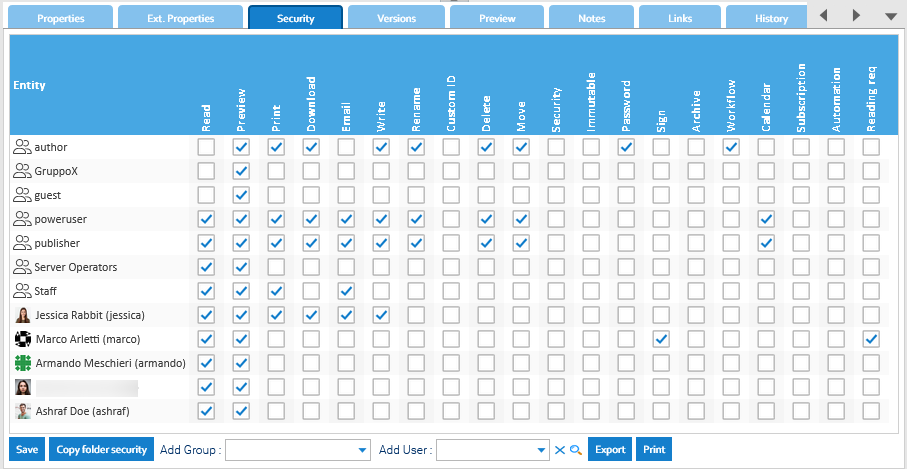
If you have the Security permission in a document, you can access the Security tab of the details panel.