Intra-release patches are available in this list; each patch is designed to correct problems found on one or more versions. The exact list of fixes is available in the description.
Sometimes you want to link documents that are logically related. To do this, select the documents you want to link and then select the Copy item of the context menu. This will put the current selection into the clipboard. Then right-click on a target...
This manual activation procedure can be used when the LogicalDOC's server is isolated from the Internet and cannot contact the remote license manager. Access the license page at the following URL: http://your_server_ip:your_server_port/license where...
Anytime a new task in which you are a participant has to be completed, you receive a notification by email. You can see all the details of the job in the Workflow section of the Dashboard. Here you find three dashlets that show: tasks assigned to you...
LogicalDOC is an advanced system that allows you to handle a large volume of data. Once installed, you will be able to configure customize it in order to maximize the benefits from your installation. This manual is intended for use by the...
A Hardware Bound License is tied to the hardware of the server where you installed LogicalDOC in. Licenses of this type are associated with a specific device upon activation and do not work on other computers. To check if you are using a license bound...
Each tenant has its own data: users, folders, documents, templates... When a user logs in, he will operate inside his tenant in a complete isolation. LogicalDOC associates each username to a specific tenant, that's why you cannot use the same username...
Lock / Unlock If you want to protect the document so that no other users can make changes to it, use the Lock item from the context menu. This means that until it is unlocked, no other user can modify it. Once locked, a padlock icon appears. If you...
When your search is more concerned on the parameters of the document, you could use the Parametric Search feature. To perform this kind of search, you have to add as many conditions as you want on the document's metadata. It is possible to restrict the...
This report shows you all the archived documents you have in the system, you can also select a folder to restrict the visualization to a specific partition of your repository. You can interact with the elements of the report by right-clicking on them...
LogicalDOC offers PDF digital signing capabilities. In case you want to sign a document that is not PDF, its PDF conversion will be signed. Top-Level View From a high-level functional point of view, here is what users need to be able to do using the...
This report shows you all the documents that were logically deleted, you can also filter by user and folder. You can interact with the elements of the report by right-clicking on them and choose one of the possible actions. When you choose to restore a...
This report shows you all the folders that were logically deleted, you can also filter by user and parent folder. You can interact with the elements of the report by right-clicking on them and choose one of the possible actions. When you choose to...
Aliases are pointers to real documents that you may use to distribute the same content in different folders with different security policies, you may have more than one alias that point to the same real document. Creating an Alias From the list of...
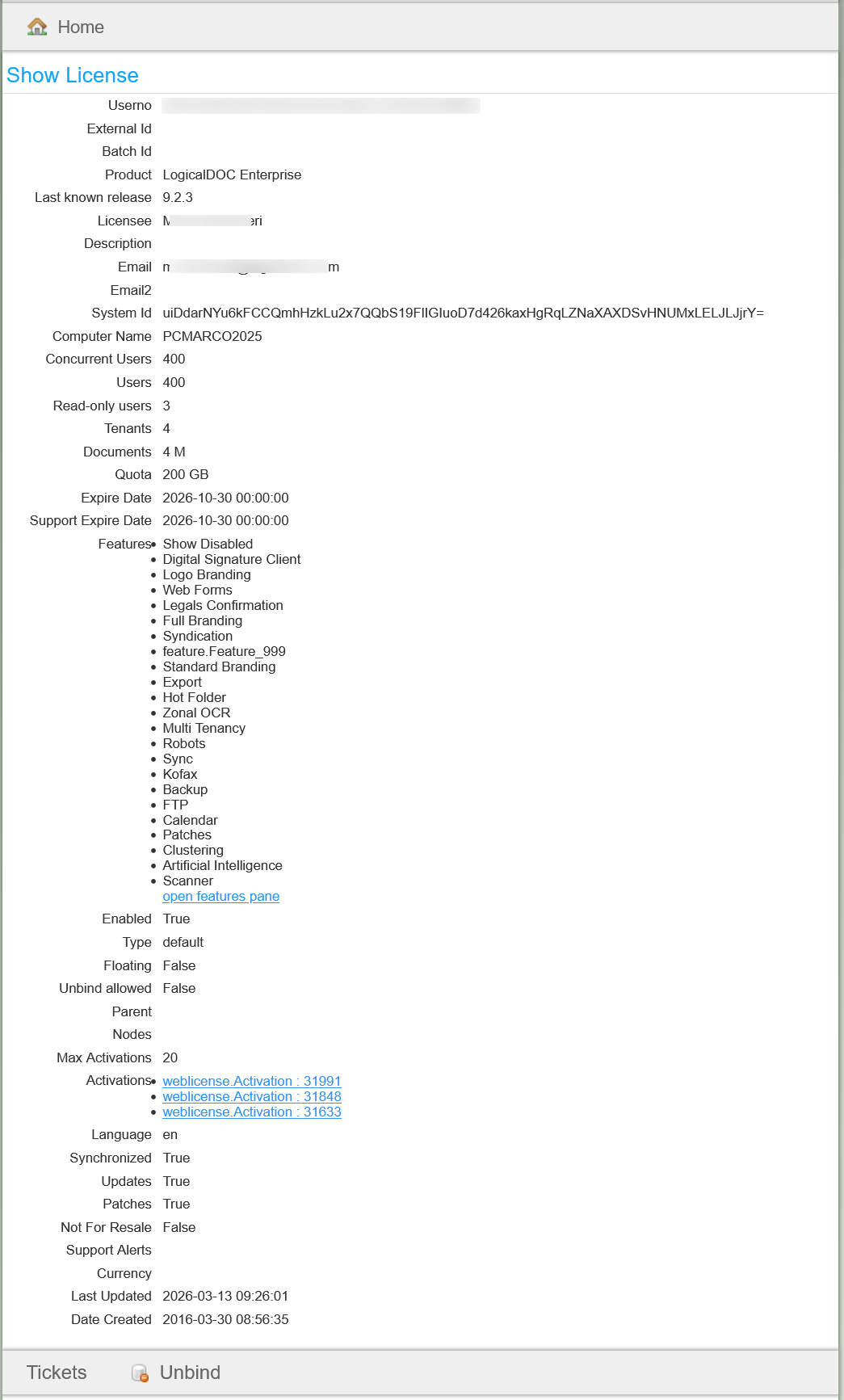
This is the most important section because it displays all the information about your license as it is recorded in the LogicalDOC's informative system [lightbox2 title="Customer Portal - License" data-caption="Customer Portal - Updates"...
When your search is more concerned on the parameters of the document, you could use the Parametric Search feature. To perform this kind of search, you have to add as many conditions as you want on the document's metadata. It is possible to restrict the...
This report shows you all the archived documents you have in the system, you can also select a folder to restrict the visualization to a specific partition of your repository. You can interact with the elements of the report by right-clicking on them...
LogicalDOC offers PDF digital signing capabilities. In case you want to sign a document that is not PDF, its PDF conversion will be signed. Top-Level View From a high-level functional point of view, here is what users need to be able to do using the...
This report shows you all the documents that were logically deleted, you can also filter by user and folder. You can interact with the elements of the report by right-clicking on them and choose one of the possible actions. When you choose to restore a...
This report shows you all the folders that were logically deleted, you can also filter by user and parent folder. You can interact with the elements of the report by right-clicking on them and choose one of the possible actions. When you choose to...
Aliases are pointers to real documents that you may use to distribute the same content in different folders with different security policies, you may have more than one alias that point to the same real document. Creating an Alias From the list of...
This is the most important section because it displays all the information about your license as it is recorded in the LogicalDOC's informative system [lightbox2 title="Customer Portal - License" title="Customer Portal - Updates"...
When your search is more concerned on the parameters of the document, you could use the Parametric Search feature. To perform this kind of search, you have to add as many conditions as you want on the document's metadata. It is possible to restrict the...
This report shows you all the archived documents you have in the system, you can also select a folder to restrict the visualization to a specific partition of your repository. You can interact with the elements of the report by right-clicking on them...
LogicalDOC offers PDF digital signing capabilities. In case you want to sign a document that is not PDF, its PDF conversion will be signed. Top-Level View From a high-level functional point of view, here is what users need to be able to do using the...
This report shows you all the documents that were logically deleted, you can also filter by user and folder. You can interact with the elements of the report by right-clicking on them and choose one of the possible actions. When you choose to restore a...
This report shows you all the folders that were logically deleted, you can also filter by user and parent folder. You can interact with the elements of the report by right-clicking on them and choose one of the possible actions. When you choose to...
Aliases are pointers to real documents that you may use to distribute the same content in different folders with different security policies, you may have more than one alias that point to the same real document. Creating an Alias From the list of...
This is the most important section because it displays all the information about your license as it is recorded in the LogicalDOC's informative system [lightbox2 title="Customer Portal - License">
Sometimes you want to link documents that are logically related. To do this, select the documents you want to link and then select the Copy item of the context menu. This will put the current selection into the clipboard. Then right-click on a target...
This manual activation procedure can be used when the LogicalDOC's server is isolated from the Internet and cannot contact the remote license manager. Access the license page at the following URL: http://your_server_ip:your_server_port/license where...
Anytime a new task in which you are a participant has to be completed, you receive a notification by email. You can see all the details of the job in the Workflow section of the Dashboard. Here you find three dashlets that show: tasks assigned to you...
LogicalDOC is an advanced system that allows you to handle a large volume of data. Once installed, you will be able to configure customize it in order to maximize the benefits from your installation. This manual is intended for use by the...
A Hardware Bound License is tied to the hardware of the server where you installed LogicalDOC in. Licenses of this type are associated with a specific device upon activation and do not work on other computers. To check if you are using a license bound...
Each tenant has its own data: users, folders, documents, templates... When a user logs in, he will operate inside his tenant in a complete isolation. LogicalDOC associates each username to a specific tenant, that's why you cannot use the same username...
Lock / Unlock If you want to protect the document so that no other users can make changes to it, use the Lock item from the context menu. This means that until it is unlocked, no other user can modify it. Once locked, a padlock icon appears. If you...
When your search is more concerned on the parameters of the document, you could use the Parametric Search feature. To perform this kind of search, you have to add as many conditions as you want on the document's metadata. It is possible to restrict the...
This report shows you all the archived documents you have in the system, you can also select a folder to restrict the visualization to a specific partition of your repository. You can interact with the elements of the report by right-clicking on them...
LogicalDOC offers PDF digital signing capabilities. In case you want to sign a document that is not PDF, its PDF conversion will be signed. Top-Level View From a high-level functional point of view, here is what users need to be able to do using the...
This report shows you all the documents that were logically deleted, you can also filter by user and folder. You can interact with the elements of the report by right-clicking on them and choose one of the possible actions. When you choose to restore a...
This report shows you all the folders that were logically deleted, you can also filter by user and parent folder. You can interact with the elements of the report by right-clicking on them and choose one of the possible actions. When you choose to...
Aliases are pointers to real documents that you may use to distribute the same content in different folders with different security policies, you may have more than one alias that point to the same real document. Creating an Alias From the list of...
This is the most important section because it displays all the information about your license as it is recorded in the LogicalDOC's informative system [lightbox2 title="Customer Portal - License" width="500">
In a process that handle incoming invoices, a set of approval steps are required and if the invoice is finally approved, it...
The system provides to you the Archive Viewer application. It allows you to verify any archive finalized by the system. This application has three functionalities: Verify: archive verification Browse: listing of all documents inside an archive Search:...
From the documents list grid, select the documents you want to move and then select the [Cut] item of the context menu. This will put the current selection into the clipboard. [lightbox2 title="cut document"...