d is required
Editing the content of a document
LogicalDOC handles the modifications of content through check-out/check-in cycles. However, these changes are only possible if you have the Write permission in the folder where the document is stored. The check-out operation locks the document so that...Install on QNAP
QNAP is a global producer of powerful yet affordable Network-Attached Storages (NAS). Find more information about QNAP here: https://www.qnap.com.
Save a Document
Click the Save or Save As button in the LogicalDOC ribbon to save the current Microsoft Office document into the LogicalDOC repository. The Save Document window allows you to browse the LogicalDOC folder tree, select the destination folder and specify...
Workflow Designer
The product provides a completely web-based designer that can be used to visually model your business processes (workflow templates) without having to install additional software. The workflow designer is available in Administration > Document metadata...
Email Accounts
The system can store emails and their attachments by downloading them from remote email accounts. You can configure a number of email accounts so that they will be regularly inspected by the system, searching for new posts to be imported as documents....
Best Performance
The purpose for this kind of clustering is to scale up the performances when the improvements on a single server would not be enough. A typical scenario is when you have a lot of concurrent users or very huge documents repository to index. LogicalDOC...
Send a document by Email
To send a document as a mail attachment, first select a document. The next step is to select the Send by Email item from the context menu. It will be shown as an email composer in which you can insert the recipients that will receive your message....
Access Control
Instead of assigning access rights to each user individually(that in any case is also supported), we suggest administrators to assign permissions to groups, what in other systems you may see as "roles". Role-Based Access Control (RBAC) Role-Based...
Google Drive
[alert style="uk-alert"][heading size="h3" style="underline"][icon style="fa fa-info-circle"> Privacy Policy
Before you activate this feature, please take a look at our Google Integration Privacy Policy Workflow Designer
The product provides a completely web-based designer that can be used to visually model your business processes (workflow templates) without having to install additional software. The workflow designer is available in Administration > Document metadata...Email Accounts
The system can store emails and their attachments by downloading them from remote email accounts. You can configure a number of email accounts so that they will be regularly inspected by the system, searching for new posts to be imported as documents....Best Performance
The purpose for this kind of clustering is to scale up the performances when the improvements on a single server would not be enough. A typical scenario is when you have a lot of concurrent users or very huge documents repository to index. LogicalDOC...Send a document by Email
To send a document as a mail attachment, first select a document. The next step is to select the Send by Email item from the context menu. It will be shown as an email composer in which you can insert the recipients that will receive your message....Access Control
Instead of assigning access rights to each user individually(that in any case is also supported), we suggest administrators to assign permissions to groups, what in other systems you may see as "roles". Role-Based Access Control (RBAC) Role-Based...Google Drive
[alert style="uk-alert"][heading size="h3" style="underline"][icon style="fa fa-info-circle">Copying, Moving and Deleting documents
Copying and moving documents requires having at least Read right on the original document and Write right in the target folder. Copying and moving are done using the clipboard, which is located in the status bar. Copy In the documents list select the...Tokens Detector
The Tokens Detector is a specialized natural language model designed to identify and extract specific pieces of information, called tokens, from within a sentence. It is used to detect structured data like IDs, names, dates, or codes embedded in...Editing the metadata of a document
Metadata is the basis of any modern record management system. LogicalDOC allows you to store the standard and custom metadata of your documents. To be able to edit the metadata, you will need the Write permission. Standard properties In the document's...Digitally signing a document
To digitally sign a document, you have to set up your certificate first. See here how to generate or load your own digital certificate. Signing a document Make sure to have the Sign permission, then open the Signature tab of the document's properties...Tickets
Tickets are unique codes bound to special links that can then freely distributed to give access to a specific document to people not registered in the system. Only those users with download permission can create a ticket. If you have such a permission,...Dashboard
The Dashboard screen offers several information services and utilities, including user statistics, tags, messages, calendar events, and workflow tasks. User This section shows statistical information about your system activities, including the list of...Working with Documents
You can work on documents by accessing the Documents area. Click on a folder in the browser, and on the right side, a grid will show you all the documents that it contains. The documents grid allows the selection of multiple elements, while a...Setting up folder's security policies
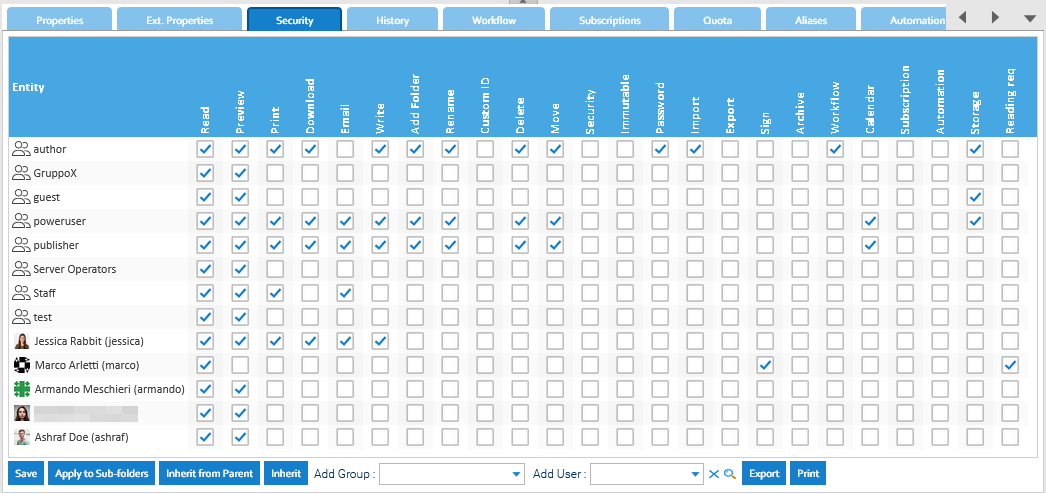
If you have the Security permission in a folder, you can access the Security tab of the details panel.