d is required
Automation
The Automation is a pervasive aspect of the LogicalDOC platform and represents the way you have to program things using a simple scripting language. Sometimes you wish LogicalDOC to execute your own logic when something special happens during a...Stamps
Stamp is only allowed in the Documents screen for any document which is a PDF or can be converted to PDF. In order to stamp a document, it is necessary to have working integration with 3rd party software as described in the installation guide. You can...Designing a Workflow
To add a new Task in your workflow template, click the on Add Task button in the toolbar and a new square appears into the design panel. By default, it is a blue square, if you want to make it your initial task, just double click over it and select the...Fillers
Fillers are configurable components used to extract and populate structured information from documents automatically. They define how specific data, such as tags, language, and templates, are identified and retrieved from document content. Fillers are...Backup Installation
The LogicalDOC Backup needs to be installed in the same server that is running your LogicalDOC. Download and launch the installation package for your system from the download website. During the setup, you will be prompted to provide the folder where...Object Detection
Object detection is a computer vision technique that identifies and locates multiple objects within an image by predicting their classes and positions using bounding boxes. Unlike image classification, which assigns a...Custom Reports
The Custom Reports package leverages the reporting features of Eclipse BIRT, enabling users to create reports on the application's activity, directly from LogicalDOC. Users can create and generate reports, defining what...Search and Indexing
Here you can retrieve information about and configure the Search engine, the installed index languages, the available parsers and the queue of documents to be indexed. Search engine Entries count: displays the number of elements in the index...GUI Settings
A set of behaviors and parameters of the user interface are configurable in the GUI Settings page. Welcome message: a message displayed to all the users when they sign in Preview window: percentage of the screen width occupied by the preview window...Install on Synology
Synology is a global producer of advanced and intelligent Network-Attached Storages (NAS). Find more information about Synology here: https://www.synology.com. [alert style="uk-alert-warning"][heading size="h3" style="underline"][icon style="fa...DocuSign
DocuSign allows organizations to manage electronic agreements and offers eSignature, a way to sign electronically on different devices. Signatures processed by DocuSign are compliant with the US ESIGN Act and the European...Dashlets
A dashlet is a small window that appears in the user's dashboard. The purpose of a dashlet is to show useful information about the user's activities inside the system. Each user can customize his dashboard by placing a set of dashlets made available by...Key Store (Digital Signature)
The Digital Signature feature adds PDF signing capabilities to the LogicalDOC Platform. It also provides generation of user certificates, which are required for document signing. LogicalDOC allows users to: download the PDF for previewing, download the...Outgoing Messages
The LogicalDOC Outlook Add-in helps you manage outgoing correspondence without leaving Microsoft Outlook. You can file sent emails and their attachments in LogicalDOC, or attach documents already stored in the LogicalDOC repository to a message you are...Setting up document's security policies
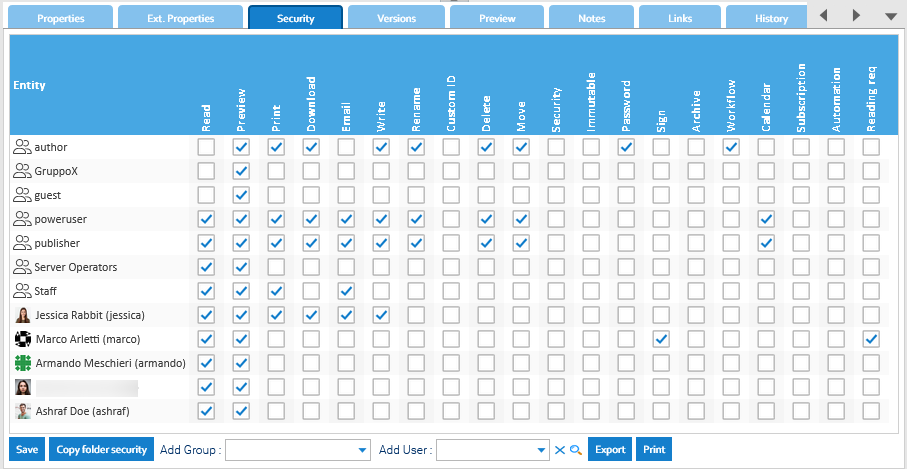
If you have the Security permission in a document, you can access the Security tab of the details panel.