add is required
Fillers
Fillers are configurable components used to extract and populate structured information from documents automatically. They define how specific data, such as tags, language, and templates, are identified and retrieved from document content. Fillers are...Firewall
You can access and edit the Firewall preferences by going to Administration > Security > Firewall The Firewall allows administrators to restrict or allow access to the system based on: IP addresses Hostnames Network ranges (CIDR notation) When enabled,...Adding Bookmark
Bookmarking folders is a common operation that allows you to quickly access your most important folders. To add new bookmarks, you have to select the folder you want and then click on the [Add bookmark] context menu item. Once the bookmark has been...Adding new documents
In LogicalDOC, there are a variety of ways that a user can upload documents. The options are described below. It is important to remember that the user must select a folder with write permission to be able to create new documents. [alert...Adding a Form
If you have the write permission in the current folder, you can create a new PDF document by filling the fields with one of the available forms. To do so, click on the Add a form icon and select one of the available forms. Click on Save to confirm, and...Adding an event to the Calendar
LogicalDOC allows you to add calendar events, the calendar is a useful tool to coordinate activities among your colleagues. Each event in the calendar may be associated to one or more documents, so select some documents and click on the toolbar icon...Configure Outlook Addin
Once installed, open your Outlook and note that a new menu now appears in the menu bar, open this menu and select the [Configuration] item. In the configuration form, you have to put the following information: Username: the username you use to log in...Configure Office Addin
Once installed, open your Office and note that a new button now appears in the menu bar, open this menu and select the Settings item. In the configuration form, you have to put the following information: Username: the username you use to log in into...Microsoft Office Addin
You can edit all Office documents directly in Word, Excel or PowerPoint and save them into the documents archive. Pre-requisites You need Microsoft Office. You have to install in your Windows PC the latest LogicalDOC Office...Microsoft Outlook Addin
You can archive emails and attachments into the system directly from your Outlook mailer. In the same way, you can attach to your outgoing emails documents picked from the system. Pre-requisites You need Microsoft Outlook....Send a document by Email
To send a document as a mail attachment, first select a document. The next step is to select the Send by Email item from the context menu. It will be shown as an email composer in which you can insert the recipients that will receive your message....Configuring DocuSign API access
1. Visit the DocuSign administration To allow LogicalDOC to have access to your DocuSign account, you have to prepare an integration key first, so enter your DocuSign administration and click on the API and Keys link in the INTEGRATIONS menu....PowerPoint Addin
You can edit a PowerPoint document by simply selecting the item and then click on the [Edit with Office] icon. After that, the document is visualized into Microsoft PowerPoint.Annotating a Document
You can add notes on the documents, via the Notes tab. Notes enable users to discuss the document and its evolution. All users with read permission can see the notes added to a document. You can add a new note by clicking on the button Add Note. Put...Receive backup reports by Email
The LogicalDOC Backup can send to a list of recipients a report with the result of each elaboration. This keeps you updated on the status of the backup of your system without the need to periodically inspect the logs. To allow the tool to send you the...Protocols
LogicalDOC normally uses the HTTP or HTTPS protocols, but it also implements additional protocols you might want to control in the Protocols section. Additional protocols implemented by LogicalDOC Protocol Description Configuration WebService Used for...Users
This panel shows the list of all users currently existing into the system. To add a new user, you have to click on Add User button and then fill all the required data: Username Email First Name Last Name Language Group Each user can belong to one or...Configuring Whatsapp API access
LogicalDOC can use WhatsApp as an additional channel to send notifications to users, such as the security key during two-factors authentication or alerts triggered by workflows. However, unlike other communication channels such as emails and system...Setting up folder's security policies
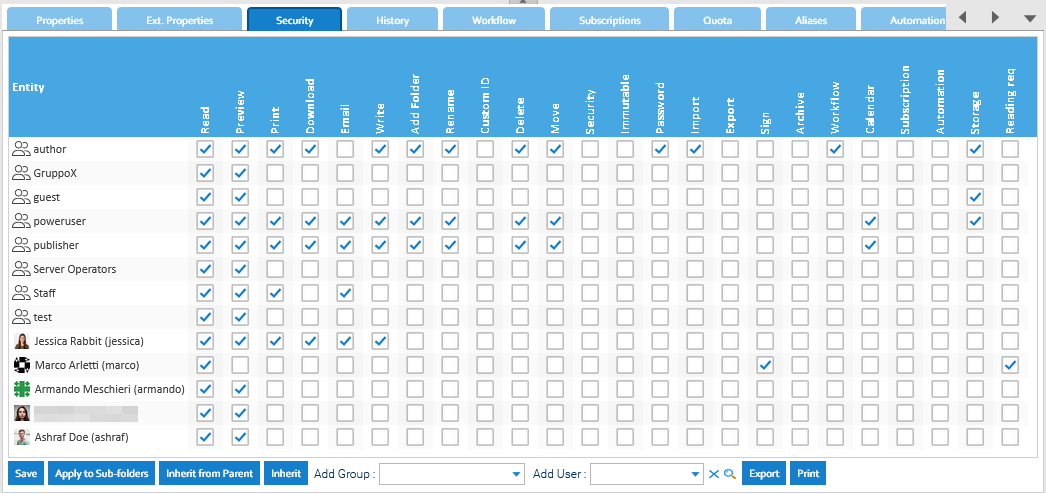
If you have the Security permission in a folder, you can access the Security tab of the details panel. [lightbox2 title="Folder's security" data-caption="edit-with-office"...Annotating a Document
You can add notes on the documents, via the Notes tab. Notes enable users to discuss the document and its evolution. All users with read permission can see the notes added to a document. You can add a new note by clicking on the button Add Note. Put...Receive backup reports by Email
The LogicalDOC Backup can send to a list of recipients a report with the result of each elaboration. This keeps you updated on the status of the backup of your system without the need to periodically inspect the logs. To allow the tool to send you the...Protocols
LogicalDOC normally uses the HTTP or HTTPS protocols, but it also implements additional protocols you might want to control in the Protocols section. Additional protocols implemented by LogicalDOC Protocol Description Configuration WebService Used for...Users
This panel shows the list of all users currently existing into the system. To add a new user, you have to click on Add User button and then fill all the required data: Username Email First Name Last Name Language Group Each user can belong to one or...Configuring Whatsapp API access
LogicalDOC can use WhatsApp as an additional channel to send notifications to users, such as the security key during two-factors authentication or alerts triggered by workflows. However, unlike other communication channels such as emails and system...Setting up folder's security policies
If you have the Security permission in a folder, you can access the Security tab of the details panel. [lightbox2 title="Folder's security" title="edit-with-office"...Annotating a Document
You can add notes on the documents, via the Notes tab. Notes enable users to discuss the document and its evolution. All users with read permission can see the notes added to a document. You can add a new note by clicking on the button Add Note. Put...Receive backup reports by Email
The LogicalDOC Backup can send to a list of recipients a report with the result of each elaboration. This keeps you updated on the status of the backup of your system without the need to periodically inspect the logs. To allow the tool to send you the...Protocols
LogicalDOC normally uses the HTTP or HTTPS protocols, but it also implements additional protocols you might want to control in the Protocols section. Additional protocols implemented by LogicalDOC Protocol Description Configuration WebService Used for...Users
This panel shows the list of all users currently existing into the system. To add a new user, you have to click on Add User button and then fill all the required data: Username Email First Name Last Name Language Group Each user can belong to one or...Configuring Whatsapp API access
LogicalDOC can use WhatsApp as an additional channel to send notifications to users, such as the security key during two-factors authentication or alerts triggered by workflows. However, unlike other communication channels such as emails and system...Setting up folder's security policies
If you have the Security permission in a folder, you can access the Security tab of the details panel. [lightbox2 title="Folder's security">