Natural Language Processing

Natural Language Processing, or simply NLP, is a class of AI model designed to process naturally written texts.

NLP enables computers to understand, interpret, and generate human language. It bridges the gap between human communication and machine understanding, allowing machines to read text, hear speech, interpret it, and even respond in natural ways. NLP combines computational linguistics with statistical, machine learning, and deep learning models to process and analyze large amounts of natural language data.

By using NLP, systems can perform tasks like language translation, sentiment analysis, speech recognition, chatbot conversations, and document summarization.

How Natural Language Processing Works

NLP involves a series of techniques and steps that convert unstructured human language into structured data that machines can understand and act upon.

Text Processing

  • Tokenization: breaking text into words or phrases.
  • Stop-word Removal: filtering out common words (like "and", "the") that carry little meaning.
  • Stemming/Lemmatization: reducing words to their base or root form.

Syntax and Semantics Analytics

  • Syntax Analysis (Parsing) involves analyzing the grammatical structure of a sentence, identifying parts of speech and relationships between words.
  • Semantic Analysis focuses on understanding the meaning behind words, sentences, and context.

Feature Extraction

Relevant features are extracted from the text, such as keywords, named entities (e.g., people, places), and sentiment indicators. These features serve as input for machine learning models.

Modeling and Interpretation

Using techniques such as classification, clustering, or neural networks, the system interprets the text and performs a task, like identifying sentiment, generating responses, or categorizing content.

At the time of this writing, there are different types of NLP models, each designed to solve specific language-related tasks. The models used in LogicalDOC are:
Vector Stores

A vector store indexes and stores vector embeddings (the vectorial representation of documents) for fast retrieval and semantic search. Embeddings are generated by AI models, in the context of machine learning these features represent different dimensions of the data that are essential for understanding patterns, relationships, and underlying structures.

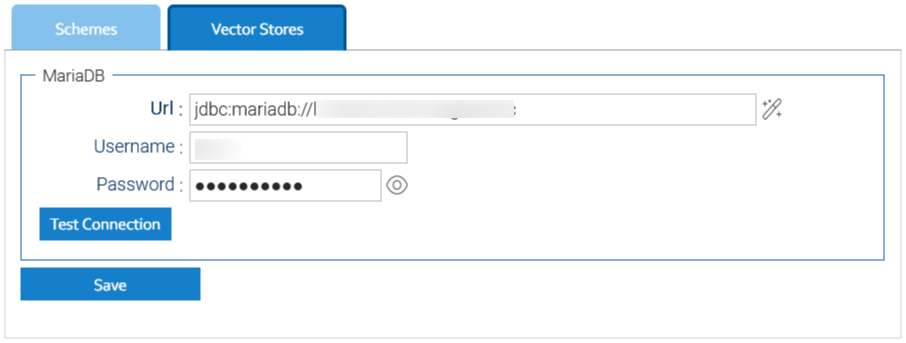
You handle the vector stores in Administration > Artificial Intelligence > Embeddings > Vector Stores

At the time of writing, LogicalDOC just supports MariaDB as vector store; in the future, more vector store providers will be made available.

It is therefore required to insert the connection details to a MariaDB (version 11.8 or greater) database; you may use the wizard icon to get some help in composing the connection Url.

MariaDB

Since LogicalDOC 9.2.2, the Windows installer also includes a modern MariaDB with vector capabilities and automatically uses it without having you to take any action. In the same way, if you already installed LogicalDOC using an older version but already connected to a MariaDB >= 11.8, the 9.2.2 update will automatically use it as vector store.

In all the other cases, you must provide an installation of MariaDB 11.8 or greater and manually configure the connection to it.

Please refer to the product's website for installing MariaDB: https://mariadb.org/download


Robots

robot is an intelligent agent designed to understand user questions and provide meaningful answers.

Robots act as an interface between the user and the Natural Language Processing (NLP) engine, using trained models to classify queries and extract key information. The platform provides a default robot is named Coach, but you may create your ones dedicated to specific areas.

How Robots Work

Each robot is configured with two core NLP models:

  • Classifier: categorizes the user’s question into a specific action or intent (e.g., GETDOC, SEARCHFILE, UNKNOWN).
  • Tokens Detector: extracts specific values from the text, such as document IDs or filenames.

When a user asks a question, the robot:

  • Classifies the sentence using the classifier.
  • Extracts tokens using the tokens detector.
  • Executes a matching automation script (called an “answer”) associated with the identified category.
  • If the classification or token extraction fails, a default fallback answer is used.

Robot Configuration

Robots are configured through the Robot Management Interface.

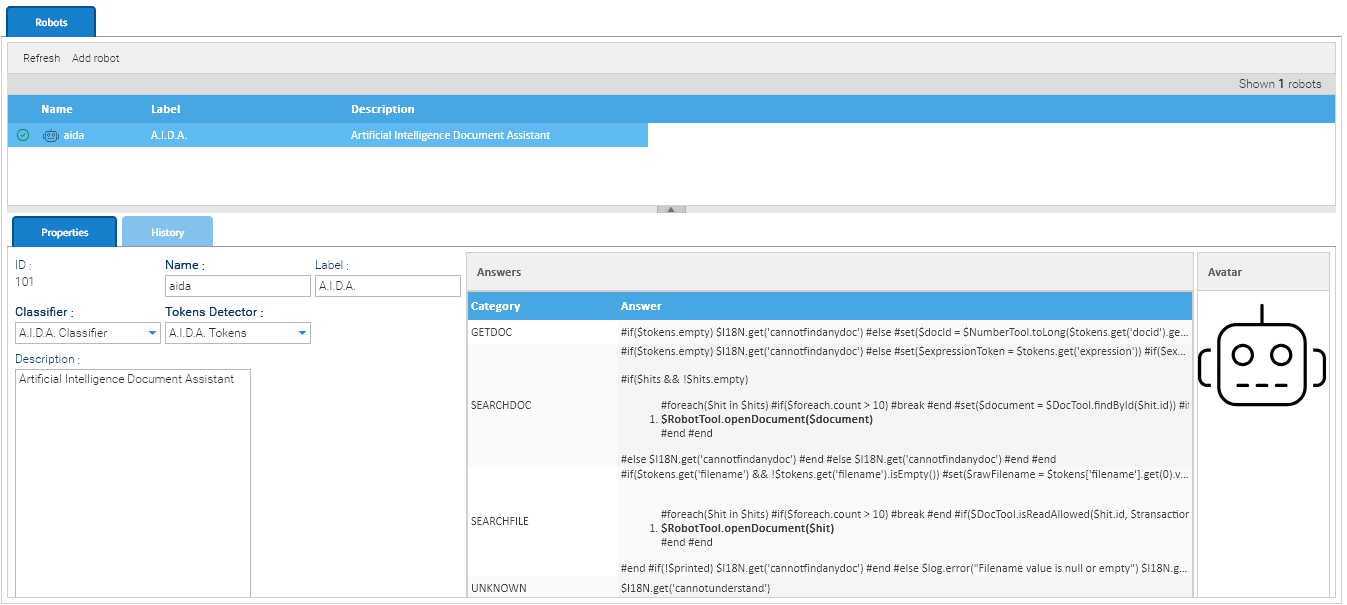
classifier_properties_specs
 

The most relevant aspect of a robot's configuration is the Answer section, where each category (e.g., GETDOC, SEARCHDOC, SEARCHFILE) is mapped to an Automation script. These scripts define how the robot responds to a user query once the classifier and tokens detector have done their job.

Using these scripts, you can:

  • Retrieve and open documents by ID
  • Perform keyword-based full-text searches
  • Look up files by name
  • Handle unknown queries gracefully

These answers are stored as Automation scripts, allowing advanced conditional logic, data access, and dynamic rendering of results. 

Dictionary available for the Automation in this context

AUTOMATION CONTEXT: ROBOT
VariableJava ClassDescription
robot

Robot

The current robot instance (e.g., A.I.D.A.).
transaction

RobotHistory

Contains metadata about the current query, user ID, tenant, and session.
categoryStringThe category assigned by the classifier (e.g., GETDOC, SEARCHDOC etc.)
tokens

Map<String, List<Result<String>>>

Extracted tokens from the input
answer

Value<String>

Value holder used to carry the answer, put here your answer

Read the Automation manual for more information.

Install a Trained Model

Training AI models is a computationally intensive and time-consuming process, often requiring specialized hardware and large datasets. For this reason, not all models can be trained directly within LogicalDOC.

To simplify adoption, the system allows users to install and use pre-trained models, which are ready to operate without additional training.
These models can be downloaded and imported into the platform, enabling advanced features such as document tagging and language detection with minimal setup.

The import process is straightforward:

1

Enter the models section

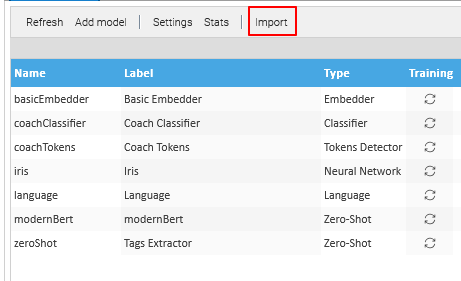
Go to Administration > Artificial Intelligence > Models

2

Download the Model file

The model to import must be a file exported from another installation or downloaded from the LogicalDOC's download center. Here are the currently available pre-trained models:

ModelVersionTypeCompatibilityDescription

Download

zeroshot-1.01.0

zeroshot

9.2.3+

Pre-trained zero-shot classification model to generate tags for documents. This model can assign relevant labels to text without requiring prior training on specific categories, allowing users to define their own tags dynamically. It analyzes the semantic meaning of the content and matches it against candidate labels, returning the most relevant tags with associated confidence scores.

language-1.01.0language9.2.3+

Pre-trained language detection model from Apache OpenNLP to automatically identify the language of a document. The model supports detection of over 100 languages and returns standardized ISO 639-3 language codes, enabling accurate and consistent language classification for textual content.

3

Import the Model file

Once you have downloaded your model file, Click on the Import button.


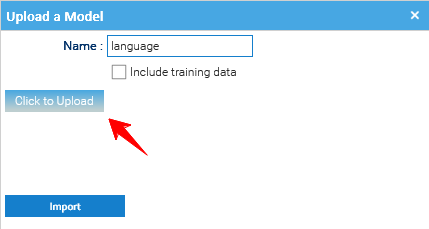
Once the Upload window appears click on Upload and select the downloaded model.

The model will appear in the list of the available models.


Embeddings

Embeddings are vectors representing entire documents or fragment of them into a continuous vector space. This numerical representation of is required to efficiently infer similitudes between documents and implement features like Semantic Search.

This means that LogicalDOC must calculate all these embeddings for the documents in your repository and save them into the Vectors Store, whose setup is a requirement.

Embedding Schemes

The process of calculating an embedding of a document is not unique, but depends on what embedding model you use.

In Administration > Artificial Intelligence > Embeddings, you can handle different embedding schemes, each one telling LogicalDOC how to process the documents with a specific embedding model.

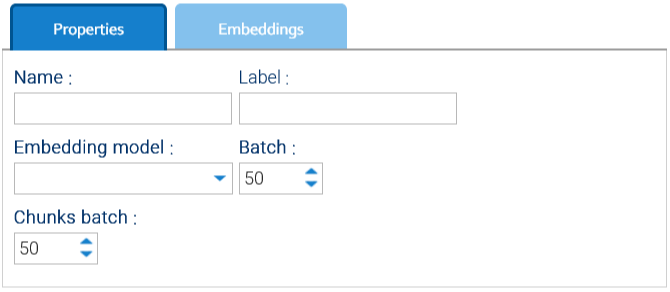
When you create a new scheme by clicking on Add embedding scheme, you will be required to specify one of the available embedding models.

At the time of writing, you can choose among the Embedder models directly coded in LogicalDOC itself or one of the embedding models available in ChatGPT.

Settings common to all embedding models are:

  • Batch: The maximum number of Documents written to the vector store in a single operation.
  • Chunks batch: How many chunks gets added into the vector store at the same time.

Settings specific to ChatGPT model are:

  • Model Spec.: name of the embedding model to use, e.g.: text-embedding-3-small
  • Vector size: must match the exact size of the embeddings produced by the chosen model, in case of text-embedding-3-small the size is 1536
  • API Key: your API key provided by ChatGPT

For more information about ChatGPT embeddings, please refer to https://platform.openai.com/docs/guides/embeddings

Info

Like the full-text indexing, even the calculation of the embeddings is very CPU intensive and so it gets carried out by the scheduled task Embedder.

Settings

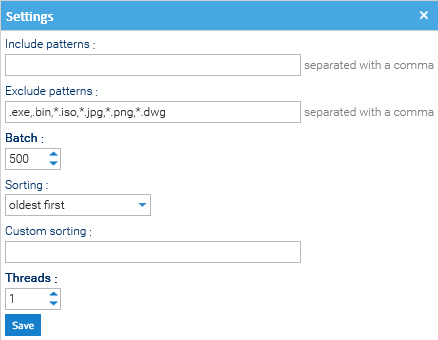
Click on the Settings button to see configuration parameters that regulate how the task works.

  • Include patterns: which document type should be embedded. If left empty, all documents will be included by default.
  • Exclude patterns: which document type should not be embedded. For example to exclude all documents with .png extension, you can insert *.png in the field. 
  • Batch: number of Documents to be processed together by the Embedder task. 
  • Sorting: Determines the order in which pending documents are embedded (e.g., prioritizing newer files or smaller files to optimize throughput).
  • Custom Sorting: Possibility to define a custom sorting logic.
  • Threads: how many parallel "workers" are running at the same time to process the embedding queue.

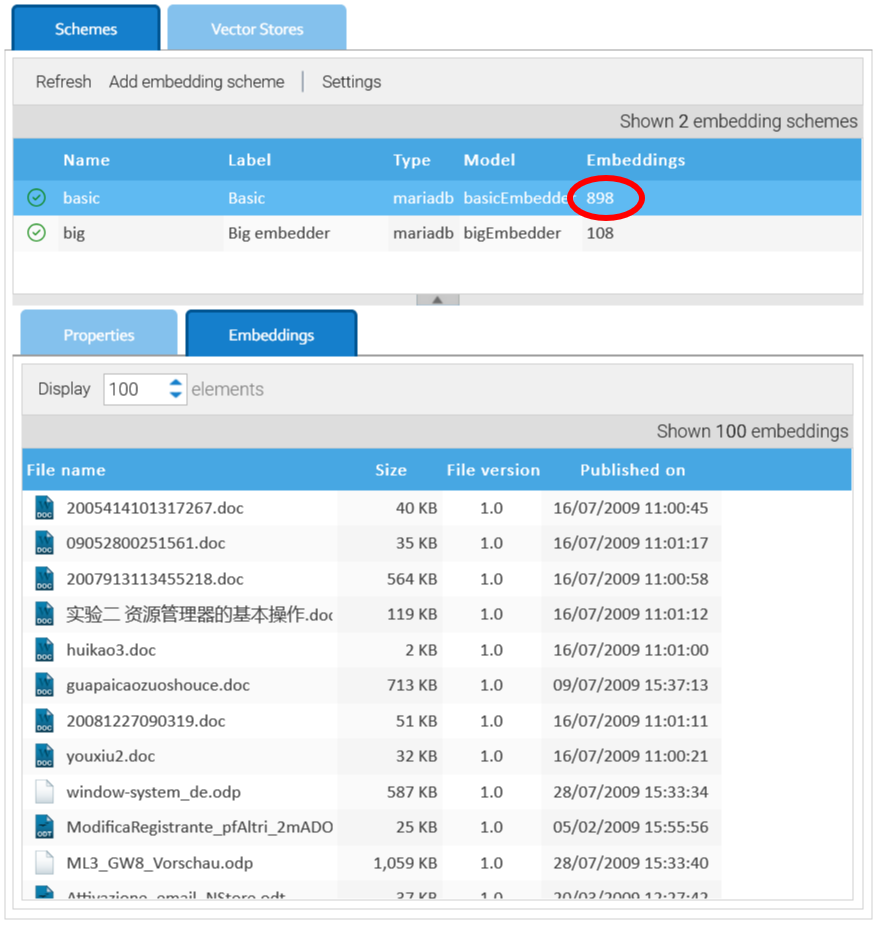
As vectors are calculated and saved into the vector store, you can see this in the counter and in the Embeddings panel.

Scheme embeddings