




Access Ticket
An Access Ticket is an access code used by the support staff to enter your system without having to provide the credentials of any user. In most cases, the support team can shed light on the problem simply by analyzing the logs and error screenshots, but sometimes it is necessary to connect to your system to test things directly.
Instead of providing us the credentials of a real user or sacrifice a license slot for a service user, you may generate an Access Ticket and communicate it to the support team; with this code they will be able to enter your installation impersonifying a user of your choice.
The Access Ticket is secure because anyone who is not part of the support staff cannot access your system even if they know all the details of the ticket.
To generate an Access Ticket go to Administration > Acess Control > Access Ticket

You can determine the validity period and also the user to impersonify, click on Generate.
In the subsequent dialog box you will see the ticket's details:
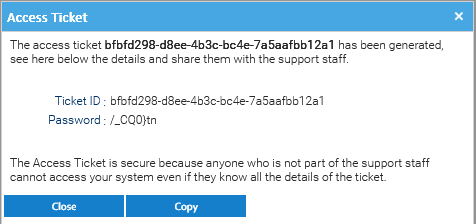
You have to provide the support team with both the Ticket ID and Password; it is secure to send both even through the same channel because anyone outside the support team that may catch tose two informations will not be able to use the ticket at all.
Netwrok connection required
The support team requires in any case to log into your installation, so if LogicalDOC is not exposed over the Internet you still require to setup a remote support session from a computer that can reach the login page.