




Embedder
The Embedder class models enable the mapping of entire documents to fixed-length vectors, making it possible their representation in a continuous vector space. This facilitates efficient comparison and manipulation of textual data in natural language processing (NLP) like semantic searches.
How the Embedder Works
The transformation of a document's content into a vector is realized through the Doc2Vec algorithm, this manual is not the right place to treat details of this technique, but you may find a lot of literature about this topic.
In a few words, the Doc2Vec makes use of a particular neural network to create a numerical representation of a document (the vector) that in general will be stored into a Vector Store, similar documents will be represented by two different yet adjacent vectors in the multidimensional vector space.
The Embedder is trained using paragraphs of text written in natural language, each paragraph terminated by a dot followed by a blank line:
Example:

She quickly dropped it all into a bin, closed it with its wooden
lid, and carried everything out. She had hardly turned her back
before Gregor came out again from under the couch and stretched
himself.

This was how Gregor received his food each day now, once in the
morning while his parents and the maid were still asleep, and the
second time after everyone had eaten their meal at midday as his
parents would sleep for a little while then as well, and Gregor's
sister would send the maid away on some errand. Gregor's father and
mother certainly did not want him to starve either, but perhaps it
would have been more than they could stand to have any more
experience of his feeding than being told about it, and perhaps his
sister wanted to spare them what distress she could as they were
indeed suffering enough.
Embedder Configuration Overview
This section describes the key configuration fields for the Embedder model. These settings define how the embedder behaves during training and how it interprets user input.
Properties
The Properties tab in the embedder interface contains the core configuration settings that define how the embedder behaves during training and embedding. These parameters influence how the input text is processed.
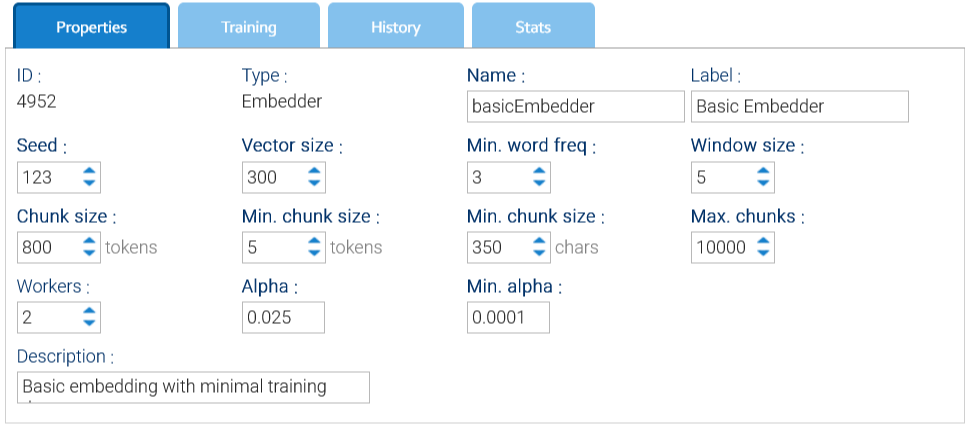
- Seed: just a value used for random numbers generation
- Workers: number of threads used for training
- Window size: size of the window used by the Doc2Vec algorithm
- Vector Size: number of elements in each single vector, should be greater than 300
- Min. word freq: words that appear less than this number will be discarded
- Max chunks: each document is subdivided into chunks of tokens, here you give a maximum number of admitted chunks
- Chunk size: target number of tokens into a single chunk
- Min. chunk size: minimum number of tokens and characters into a single chunk
- Alpha: the initial learning rate(the size of weight updates in a machine learning model during training), default is 0.025
- Min Alpha: learning rate will linearly drop to min alpha over all inference epochs, default is 0.0001